KakaoMap in English on a desktop is not something we could switch on: on September 27, 2026, we found no English setting on the map.kakao.com home screen, in the ☰ menu, or under 설정 (Settings). English place names did work in the search box and in Directions, but the entries we read were Korean, and “Gyeongbokgung” alone put restaurants first. Plan on the computer, then check on your phone.
Last checked: September 27, 2026
Key takeaways
- We found no language option on the desktop home screen, in the ☰ menu, or under 설정 (Settings); the menus stayed Korean with the browser set to English.
- Full English names such as “Gyeongbokgung Palace” and “Seoul Station” found the right place first; “Gyeongbokgung” alone put restaurants named 경복궁 first.
- In the entries we read, names, categories, and addresses were Korean even for English queries; transit labels were Korean too.
- In Directions, English suggestions appeared; picking one filled the box with the Korean name.
- The US App Store lists the KakaoMap app in English and Korean; we did not test the app.
In this guide
- At a glance
- Is there an English setting on KakaoMap’s desktop site?
- Searching for places in English
- Getting transit directions on a computer
- Korean words you’ll see (cheat sheet)
- KakaoMap desktop vs NAVER Map desktop
- When to switch to the phone app
- What we checked and what we didn’t
- FAQ
- Sources
At a glance
| Task | In English on the desktop site? | What we saw on September 27, 2026 |
|---|---|---|
| Change the language | No option found | No language setting on the home screen, in the ☰ menu, or under 설정; the site stayed Korean |
| Search a place in English | Partly | Full English names found major places first; some other searches put a different place first |
| Transit directions | Partly | English suggestions appeared while typing; the boxes and the results were Korean |
| Read results | No | In the entries we read, names, categories, and addresses were Korean |
| Use the mobile website | No, on the first screen | m.map.kakao.com showed a Korean first screen with prompts to open the app; we did not open its menu or settings |
| Use the phone app | Not tested — App Store lists English (V#1) | We did not open the app |
Is there an English setting on KakaoMap’s desktop site?
Not where we looked. On September 27, 2026, we opened map.kakao.com in a fresh, signed-out, Chrome-based browser set to English; the page kept its Korean title (카카오맵), declared its language as Korean, and its top menu read 검색 (Search), 길찾기 (Directions), 버스 (Bus), 지하철 (Subway), and MY.
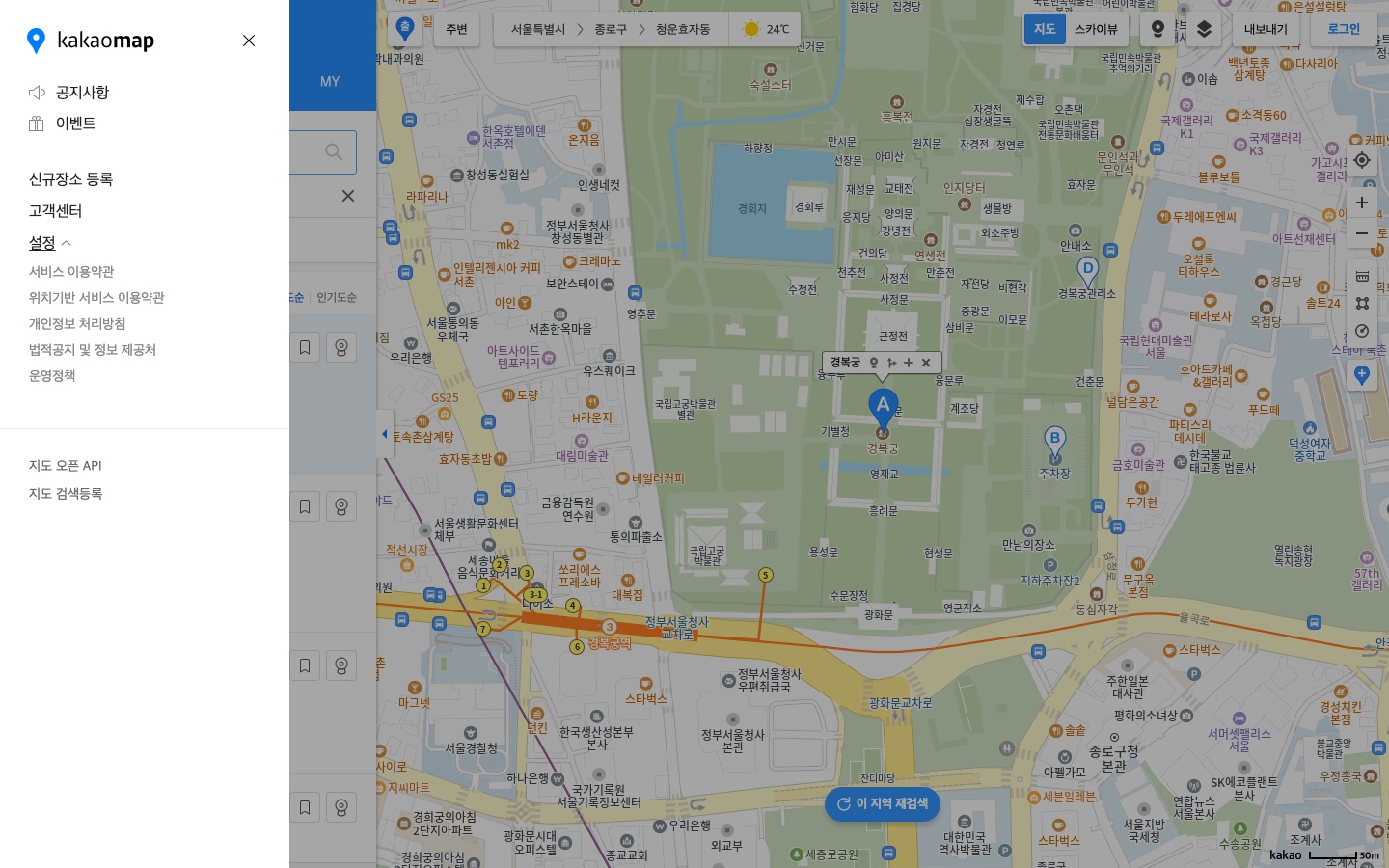
We found no language option on the home screen. When we scanned the page for language words, the only match was the privacy-policy link, whose address ended in lang=ko.
The ☰ menu (더보기, “more”) showed 공지사항 (notices), 이벤트 (events), 신규장소 등록 (add a new place), 고객센터 (help center), 설정 (settings), 지도 오픈 API (map open API), and 지도 검색등록 (map search registration). Opening 설정 showed only links to terms and policies: 서비스 이용약관 (terms of service), 위치기반 서비스 이용약관 (location-based service terms), 개인정보 처리방침 (privacy policy), 법적공지 및 정보 제공처 (legal notices and data sources), and 운영정책 (operating policy). We saw no language option on the home screen, in this menu, or under 설정.
The mobile website, m.map.kakao.com, opened once as an iPhone-size browser set to English, showed a Korean first screen (title 카카오맵, page language Korean) with prompts to open the KakaoMap app (앱으로 보기, “view in the app”, and 앱 열기, “open the app”). We did not open its menu or settings.
What Kakao says
The US App Store listing says the KakaoMap app’s languages are English and Korean.
Kakao’s help page for KakaoMap Web directions says to enter the start and destination by searching an address or a place name; it does not mention English.
On Kakao’s developer forum, staff wrote that the KakaoMap SDK supports Korean only (2024) and that the web API has no foreign-language version (2022); those answers concern developer tools, not the consumer map. We are only reporting what we saw on September 27, 2026.
Searching for places in English
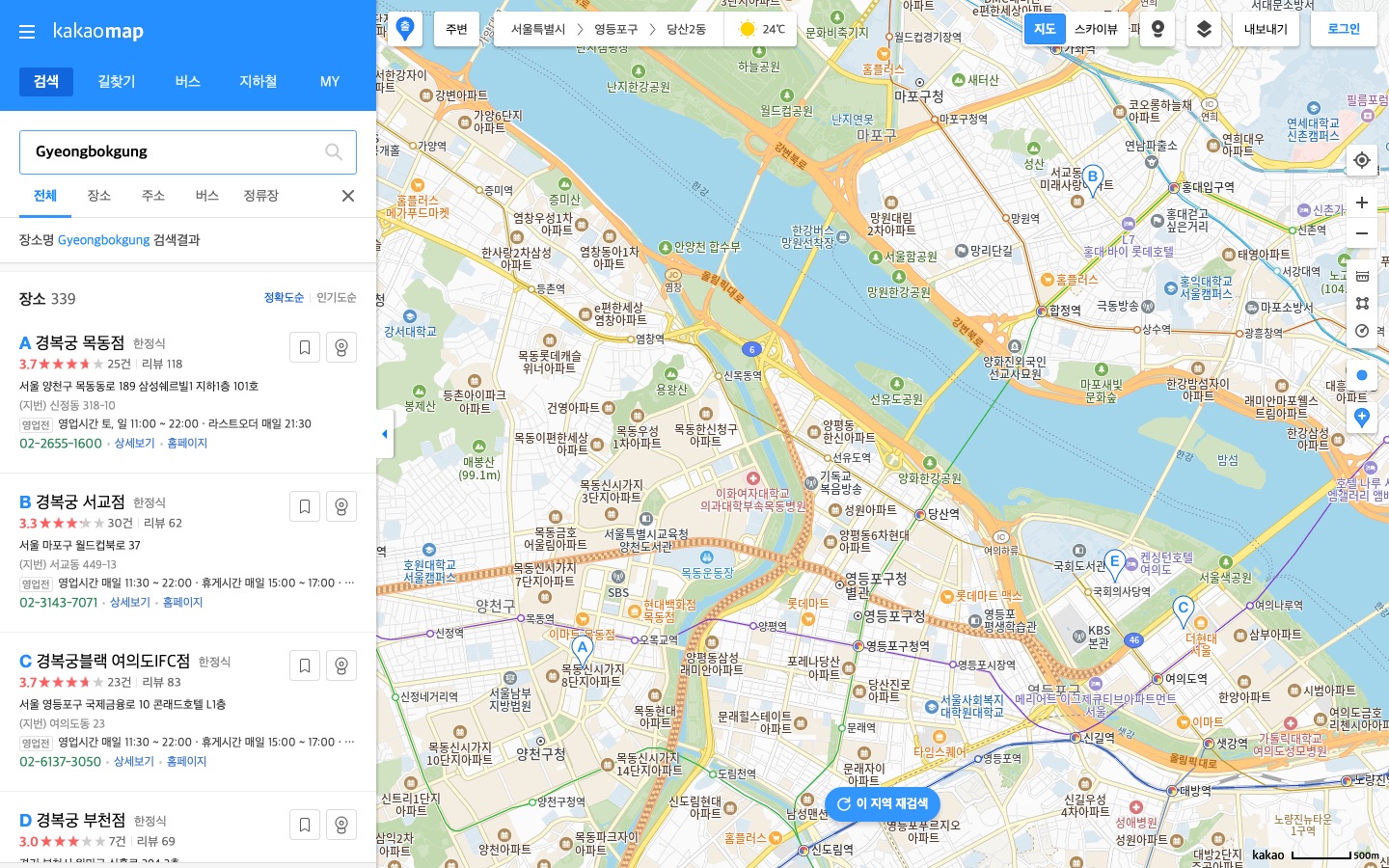
English place names did work in the search box. In fresh browser windows, these found the right place first: Gyeongbokgung Palace → 경복궁 (고궁,궁), Seoul Station → 서울역 (KTX정차역), Incheon Airport → 인천국제공항 (공항), Bukchon Hanok Village → 북촌한옥마을, Gwangjang Market → 광장시장 (시장), and Gyeongbokgung Station → 경복궁역 (Line 3). “Hongdae” put 홍대입구역 (Hongik University Station, Line 2) first in a fresh window, but 홍익대학교 (the university) first in an earlier search in a window we had already used.
Some searches put a different place first. Typing just “Gyeongbokgung” gave, as the first three entries, restaurants whose names include 경복궁 (category 한정식, Korean set-meal restaurant) in Mokdong, Seogyo, and Yeouido, not the palace. “Lotte World” put a supermarket first and the theme park second; “Myeongdong” put the Namsan cable car first and Myeongdong street second.
| What you type | What came first (September 27, 2026) |
|---|---|
| Gyeongbokgung | Restaurants named 경복궁 (한정식) in the first three entries; not the palace |
| Gyeongbokgung Palace | 경복궁 (고궁,궁), the palace |
| Lotte World | 롯데마트 월드타워점 (대형마트, a supermarket); the theme park 롯데월드 어드벤처 (테마파크) was second |
| Lotte World Adventure | 롯데월드 어드벤처, the theme park |
| N Seoul Tower | YTN서울타워 (관광,명소); N서울타워 (전망대) was second |
| Myeongdong | 남산케이블카 (Namsan cable car); 명동거리 (Myeongdong street) was second |
| Seoul Station | 서울역 (KTX정차역), the train station |
| Seoul Stn | Other subway stations: 강남역, 잠실역, 사당역; Seoul Station was not in the first three entries |
| Seoul-yeok | 서울역파출소 (a police box), an apartment complex, and 노원역지구대 (another police office); Seoul Station was not in the first three entries |
| 서울역 | 서울역 |
In the entries we read (the first three per search), names, categories, and addresses were Korean, such as 경복궁 / 고궁,궁 / 서울 종로구 사직로 161 for the palace, even for English queries. Some business names contained Latin-letter brand names (T world, KT, CGV), but we saw no English translations of place names.
Our searches ran from a connection in Seoul, and the order is what we saw in those runs; it can differ in another session or another country.
Tips for getting the right place
- Add the kind of place. “Gyeongbokgung Palace” and “Lotte World Adventure” put the intended place first in our searches, where “Gyeongbokgung” and “Lotte World” did not. Type “Palace”, “Station”, “Market”, or “Adventure” with the name.
- Check the category word next to the name. 고궁 or 궁 means palace, 시장 means market, 한정식 means a Korean set-meal restaurant, 대형마트 means supermarket, and 테마파크 means theme park.
- Check the district in the address. The palace’s address read 서울 종로구 사직로 161; 종로구 is Jongno-gu.
- If unsure, paste the Korean name. Korean 서울역 put 서울역 first, while “Seoul Stn” and “Seoul-yeok” did not have it in the first three entries.
Getting transit directions on a computer
These steps worked in our signed-out browser on September 27, 2026; we tested public transit only.
- Click 길찾기 (Directions) in the top menu.
- Type your starting point in English into the 출발지 입력 (enter start) box. For “Seoul Station”, the suggestions read “Seoul Station” and “Seoul Station KTX”.
- Pick a suggestion. The box then shows the Korean name; ours read 서울역.
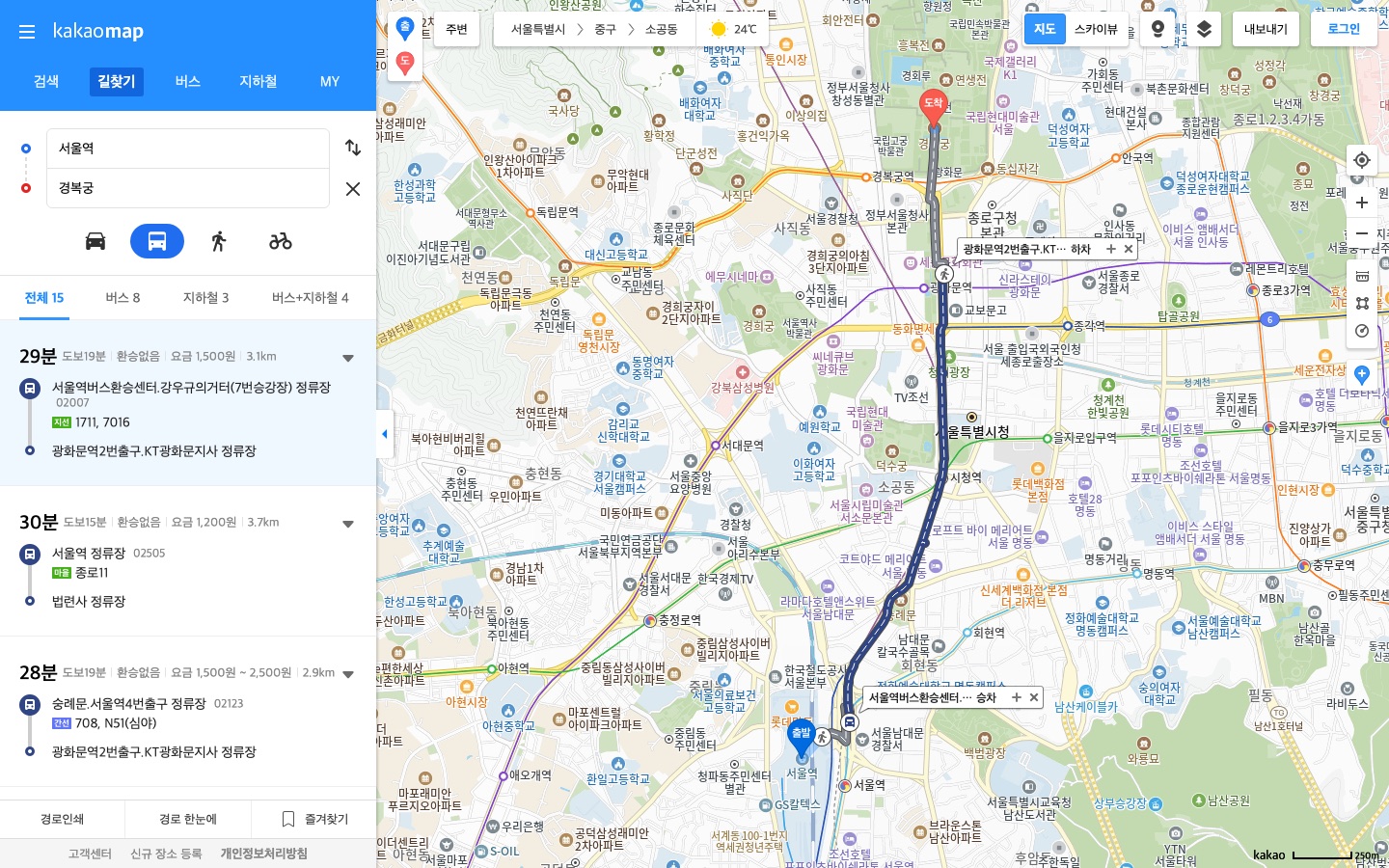
- Type your destination into the 도착지 입력 (enter destination) box. For “Gyeongbokgung Palace”, the English suggestion “Gyeongbokgung Palace” appeared; picking it changed the box to 경복궁 and opened a Korean place list with 경복궁 (고궁,궁) first. Click the entry with the right category word to confirm the place.
- Click the bus icon under the two boxes for public transit.
What the result shows
For 서울역 → 경복궁, the site listed 15 routes: 버스 8 (bus), 지하철 3 (subway), and 버스+지하철 4 (bus plus subway). The first route read, label by label:
- 29분 — 29 minutes in total.
- 도보19분 — 19 minutes on foot.
- 환승없음 — no transfer.
- 요금 1,500원 — the fare the screen showed, ₩1,500.
- Bus 1711 or 7016, boarding at the bus stop 서울역버스환승센터.강우규의거터(7번승강장) (Seoul Station bus transfer center, platform 7) and getting off at the bus stop 광화문역2번출구.KT광화문지사 (named after Gwanghwamun Station exit 2; a bus stop, not a subway exit).
All labels were Korean. This is one search, started at 10:54 KST on Sunday, September 27, 2026, not a timetable or a fare guide; we did not set or record a departure time.
Korean words you’ll see (cheat sheet)
| Korean | Meaning |
|---|---|
| 검색 | Search |
| 길찾기 | Directions |
| 버스 | Bus |
| 지하철 | Subway |
| MY | My (saved items) |
| 더보기 | More (the ☰ menu) |
| 설정 | Settings |
| 공지사항 | Notices |
| 이벤트 | Events |
| 고객센터 | Help center |
| 출발지 입력 | Enter start |
| 도착지 입력 | Enter destination |
| 분 | Minutes |
| 도보 | Walking |
| 환승없음 | No transfer |
| 요금 | Fare |
| 원 | Won (₩) |
| 고궁, 궁 | Palace (category) |
| 한정식 | Korean set-meal restaurant (category) |
| 대형마트 | Supermarket (category) |
| 테마파크 | Theme park (category) |
| 전망대 | Observation deck (category) |
| 관광,명소 | Sightseeing, attraction (category) |
| 시장 | Market (category) |
| 공항 | Airport (category) |
| KTX정차역 | KTX stop (category) |
| 호선 | Subway line (3호선 is Line 3) |
| 앱으로 보기 | View in the app (mobile website) |
| 앱 열기 | Open the app (mobile website) |
Translations are ours, not Kakao’s.
KakaoMap desktop vs NAVER Map desktop
On September 26, 2026, we ran the same kind of test on NAVER Map’s desktop site, map.naver.com; its Settings had no language option either. With the browser language set to English, some NAVER Map content (promotion cards, area names, transit route labels) appeared in English while its menus stayed Korean; details are in our NAVER Map desktop test. On KakaoMap, in the entries we read, we saw no English translations of place names, and “Seoul Station” put 서울역 first. We are not calling one better than the other.
Update, October 1, 2026: we later typed the same ten English searches into both desktop sites side by side and ran one bus route on both. See NAVER Map vs KakaoMap for Foreigners: 10 Searches, Side by Side for what each map put first and which one we’d start with.
When to switch to the phone app
The US App Store lists the KakaoMap app’s languages as English and Korean. Kakao’s reply to a user on Google Play, dated 2018, points to Settings → App settings (설정 → 앱 설정) in the app; it is old, so treat it as a pointer, not current steps. We did not test the app. Plan on the laptop, then check each place on the phone.
Update, October 7, 2026: if you plan to take a taxi to a place you found on KakaoMap, see Can Foreigners Use Kakao Taxi? for what Kakao T’s help center says about foreign cards and paying the driver, and when we suggest k.ride instead.
What we checked and what we didn’t
How we tested: on September 27, 2026, with test runs starting between 10:49 and 10:55 Korea time (an extra screenshot run started at 11:10), from an internet connection in Seoul. For the desktop site we used Chromium 151 in headless mode, not signed in (no cookies), the browser language set to US English, the time zone set to New York, and a 1440×900 window. On the desktop site we read the home screen, the ☰ menu, and 설정, ran the search comparisons above each in a fresh window (first three entries read; a few earlier exploratory searches reused one window), and ran one transit route. We opened the mobile website once, as an iPhone-size browser with English language, to its first screen only.
Not tested: connections from outside Korea; being signed in to a Kakao account; the KakaoMap phone app; driving and walking directions; the mobile website’s menu and settings; and browser translation tools such as Chrome’s Translate.
FAQ
Can I change KakaoMap to English on a computer?
Not where we looked. On September 27, 2026, the desktop site’s ☰ menu had no language item, its 설정 (Settings) page held only links to terms and policies, and the page stayed Korean.
Why did “Gyeongbokgung” show restaurants?
Because restaurants whose names include 경복궁 (category 한정식) filled the first three entries in our search. “Gyeongbokgung Palace” put the palace, 경복궁 (고궁,궁), first.
Does KakaoMap’s English search work on desktop?
Yes for full names, in our test: Gyeongbokgung Palace, Seoul Station, Incheon Airport, Bukchon Hanok Village, Gwangjang Market, and Gyeongbokgung Station each found the right place first. “Seoul Stn” and “Seoul-yeok” did not show Seoul Station in the first three entries, and the entries we read were Korean.
Is the KakaoMap app in English?
The US App Store listing says the app’s languages are English and Korean, and Kakao’s 2018 reply to a user points to Settings → App settings. We did not test the app ourselves.
Sources
All official pages checked September 2026.
- Apple App Store (US): KakaoMap
- Google Play: KakaoMap (English description)
- Google Play: KakaoMap, with Kakao’s 2018 reply on the language setting
- KakaoMap desktop site
- Kakao Customer Service: KakaoMap Web directions
- Kakao DevTalk: KakaoMap SDK language, October 2024
- Kakao DevTalk: KakaoMap web API foreign-language support, May 2022
- Our own tests: KakaoMap desktop site (map.kakao.com), September 27, 2026.