Foreigners can switch NAVER Map to English, and NAVER’s Google Play listing says its maps and driving navigation are provided in English. You need a NAVER account for the foreign-tourist “Things to do” booking tab, and Passport Verification checks your passport against that account. And since June 4, 2026, Passport Verification has given visitors with a non-Korean passport access to supported booking, ordering, and payment services in NAVER Map without a Korean mobile number. Here’s what to set up before you fly.
Last checked: September 25, 2026
Key takeaways
- Switch the app to English: MY icon > settings gear icon > Language (app version 5.1.3 or later).
- You need a NAVER account for the foreign-tourist “Things to do” booking tab.
- Since June 4, 2026, Passport Verification has given visitors with a non-Korean passport access to supported booking, ordering, and payment services in NAVER Map without a Korean mobile number.
- The name and date of birth on your NAVER account must match your passport.
- NAVER Booking may require payment via Npay, which has a ₩5,000,000 monthly limit.
In this guide
- At a glance
- Set NAVER Map to English
- What the map itself covers
- A NAVER account for foreigners: when you need one and how to sign up
- Passport Verification for foreigners (since June 4, 2026)
- Low signal and offline
- Before you fly: checklist
- What we checked and didn’t
- FAQ
- Sources
At a glance
| What you want to do | What NAVER says you need | Source |
|---|---|---|
| Search, transit, walking, and driving directions in English | No account requirement mentioned by NAVER | Store listings, NAVER Help |
| Use the app in English | App version 5.1.3 or later | NAVER Help |
| Save your own list of places | Not stated (see Saved lists below) | NAVER tips page |
| Book “Things to do” (foreign-tourist tab) | A NAVER ID, created without name verification | NAVER Help |
| Use NAVER Booking, NAVER Order, and payments with a non-Korean passport | Passport Verification (since June 4, 2026), for supported services | NAVER press releases, NAVER Help |
| Pay for NAVER Booking as a foreign member | Npay may be required; ₩5,000,000 monthly limit | NAVER Help |
Set NAVER Map to English
NAVER’s help page lists four app languages: Korean, English, Simplified Chinese, and Japanese. In-app language settings need app version 5.1.3 or later, so update the app first.
On Android
- Tap the MY icon (your profile icon) at the top right.
- Tap the settings gear icon.
- Tap Language and pick English.
On iPhone
- Use the same in-app path: MY icon > settings gear icon > Language.
- Or open your phone’s Settings > NAVER Map > Preferred Language.
- If Preferred Language isn’t there, add one of the four supported languages under Settings > General > Language & Region, then come back.
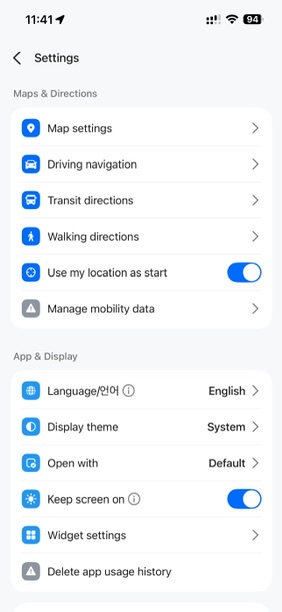
One limit: the Place Agent replies only in Korean.
In the App Store the app is listed as “NAVER Maps” (English, Japanese, Korean, Simplified Chinese); Google Play (updated September 4, 2026) says “Korean/English/Japanese/Chinese maps and English navigation provided.”
What the map itself covers
As of September 2026, NAVER’s store listings describe:
Search. One search bar for “locations, buses, subway, and more.”
Public transit. Transit directions across modes of transportation, real-time departure and arrival times, and notifications for when to get on and off.
Walking. The App Store notes say version 6.9.0 added walking directions.
Driving. English navigation.
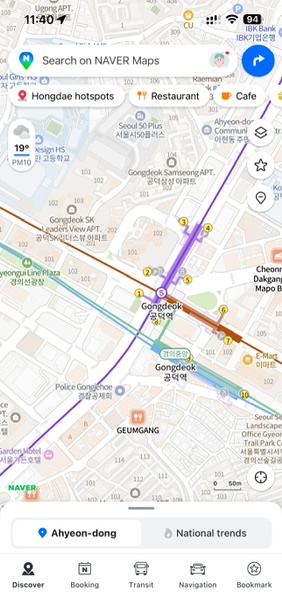
NAVER’s English useful-tips page (in Sources) covers search, directions, saved lists, live arrivals, driving, subway, and panorama.
A NAVER account for foreigners: when you need one and how to sign up
Saved lists
NAVER’s tips page says: “Create my own list of places for easy access on the map! Create my own list by theme. Share my saved list of eateries.” We have not confirmed which saving features work signed out; NAVER’s help pages don’t say.
“Things to do” in the Booking tab
For this foreign-tourist list, NAVER Help says: “Log in to Map with your NAVER ID and tap the Things to do shortcut and promotion banner.” It adds that the promotion “is not available for NAVER IDs that have completed real-name verification,” and: “If you’re a foreign tourist, please create a NAVER ID and use the app without verifying your name.”
Signing up from outside Korea: the official pages don’t agree
As of September 2026:
- NAVER’s membership privacy notice: “In countries other than Korea, users may join using their Facebook, LINE, or Apple ID.”
- NAVER’s English account-help page: “you cannot sign up by any means other than your mobile phone.” The English sign-up notice likewise lists “mobile phone number” among items collected at registration.
- NAVER’s June 9, 2026 press release says the company “has also expanded global login options” for foreign users, without naming them.
We haven’t tested sign-up from abroad, so we can’t say which page matches the app. Try to create the account at home, weeks before you fly; if it fails, you’ll have time to plan around it.
Match your passport. If you might use Passport Verification later, NAVER’s help page says “the name and date of birth on the passport must match the information submitted when signing up for your NAVER account.” Enter both exactly as your passport shows them. NAVER doesn’t say whether Passport Verification can replace a phone number at sign-up; its help page treats it as a check on an existing account.
Passport Verification for foreigners (since June 4, 2026)
What it is for
NAVER introduced Passport Verification on June 4, 2026, “allowing foreign users to verify their identity with a passport and easily access NAVER Booking, NAVER Order, and payment services.” Its June 9 release says foreign users with passports issued outside Korea can use it for bookings, orders, and payments through NAVER Map; a June 10 release names the same three services.
NAVER built it for short-term foreign visitors without Korean mobile numbers, who had trouble reserving popular venues or paying at popular restaurants. Verification “can be completed easily on a smartphone without a Korean mobile phone number or the need to contact customer support.”
What you need
- Your original passport, in hand. NAVER Help: “Please have your original passport ready for verification.”
- A passport issued by a country other than the Republic of Korea.
- A passport that has not been used to verify another ID.
- A passport that has not expired.
- A NAVER account whose name and date of birth match the passport (see above).
How it works
NAVER Help describes a passport photo followed by a face check. First, “you must take a direct photo of the passport via your device’s camera during the process.” It doesn’t mention uploading a saved image. Then “facial verification will match your face with the passport photo.” NAVER’s press release adds that “multiple verification steps are also in place.” The page doesn’t say which button starts the flow.
Limits
NAVER says it “will continue to expand the services that support it in phases.” Its pages don’t say that every restaurant or venue accepts Passport Verification, or how long a verification stays valid. They also don’t say where you have to be: nothing states it must be done in Korea, or that it can be done from abroad. If a booking matters, try it at home once your account exists; if the app stops you, you’ve lost nothing.
Paying. A separate NAVER Help page on NAVER Booking says: “To use NAVER Booking, foreign members may be required to pay via Npay. Please note that Npay has a monthly payment limit of ₩5,000,000.” That page doesn’t mention Passport Verification; treat the two as separate rules that may both apply.
Low signal and offline
NAVER’s navigation help page (in Korean) explains how map downloads work for driving:
- Navigation downloads only the map parts needed where you’re driving and reuses them later, to keep data use low.
- Downloading the map ahead of time leaves only a little data use, for real-time traffic.
- The first run after a download may not save much data, because the app is still setting up download mode.
- Update downloaded maps often so roads stay current.
That is all NAVER says: no menu path, size cap, or list of regions, and nothing on whether routing works with no connection. Full offline use is not confirmed.
For low-signal moments, plan on basics:
- Keep your hotel’s name and address in Korean in a note or screenshot.
- Screenshot your first day’s route and station names on hotel Wi-Fi.
- Sort out mobile data for arrival day; the map download on NAVER’s help page is for driving navigation.
Before you fly: checklist
- Update NAVER Map to version 5.1.3 or later, then set English: MY icon > settings gear icon > Language.
- Try to create a NAVER account from home, with your name and date of birth exactly as your passport shows them.
- If you’ll use the “Things to do” tab as a tourist, create the ID without verifying your name, as NAVER instructs.
- If a booking or restaurant order matters, try Passport Verification at home with your physical passport (see Limits).
- If you’ll use NAVER Booking, expect that payment may go through Npay, with a ₩5,000,000 monthly limit.
- Search your hotel and first-day stops, save them to your own list, and keep the addresses in Korean in a note or screenshot.
- If you’re renting a car, update any downloaded maps often, as NAVER advises.
What we checked and didn’t
Checked: NAVER press releases (June 9 and 10, 2026), NAVER Help pages in English and Korean, the membership privacy notice and sign-up notice, and the App Store and Google Play listings. We re-checked every quote against NAVER’s pages on September 22–25, 2026.
Not tested: signing up from abroad, social sign-up, Passport Verification, NAVER Booking, NAVER Order, payments, and offline use.
Not stated by NAVER: which map features work without an account, whether saving places needs a login, where Passport Verification must be done, and whether the app works fully offline. Where NAVER’s pages don’t say something, we say so.
FAQ
Do foreigners need a Korean phone number for NAVER Map?
For bookings, orders, and payments, NAVER says Passport Verification works without a Korean mobile phone number; for creating an account, NAVER’s own pages disagree (see Signing up above). Try setting up the account at home before you fly.
Does NAVER Map work in English?
Yes. Korean, English, Simplified Chinese, and Japanese are supported in version 5.1.3 and later (MY icon > settings gear icon > Language), and Google Play says English navigation is provided. One exception: the Place Agent replies only in Korean.
Can foreigners book restaurants on NAVER?
Per NAVER’s June 2026 releases, Passport Verification gives foreign users with a non-Korean passport access to NAVER Booking, NAVER Order, and payment services through NAVER Map. Foreign members may be required to pay via Npay (₩5,000,000 monthly limit). NAVER doesn’t say every restaurant accepts it, so check that the place you want uses NAVER Booking.
Can I use NAVER Map offline?
NAVER’s help page describes map downloads for driving navigation: they cut data use, but live traffic still uses some data. Plan for mobile data.
Sources
All pages checked September 2026.
- NAVER press release, June 9, 2026
- NAVER press release, June 10, 2026
- NAVER Help: Foreign passport verification
- NAVER Help: Sign-up by mobile phone
- NAVER membership privacy notice
- NAVER sign-up notice (English)
- NAVER Help: NAVER Booking (Npay)
- NAVER Help: Things to do
- NAVER Help: Language settings
- NAVER Help: Navigation map download (Korean)
- App Store: NAVER Maps, Navigation
- Google Play: NAVER Map
- NAVER Map useful tips page