For a Korea pocket Wi-Fi rental, check the handover and return arrangements before comparing the daily price. A shared router can suit a group staying together, but everyone relying on it needs to stay within its Wi-Fi range.
Last checked: October 18, 2026
This guide uses KT’s official English router and customer-center pages, plus its Korean rental terms, as a documented example. Other providers can have different rules. We have not rented a router, made a reservation, paid a deposit or measured connection speed for this article.
Key takeaways
KT currently lists a daily router plan at 4,400 won and a monthly plan at 55,000 won, with VAT included.
Its deposit rules require a credit card in your own name; a debit card is not accepted for the deposit.
Confirm the exact pickup and return counter, opening hours and charging period before booking.
Shared Wi-Fi is not a substitute for a Korean phone number or an identity-verification service.
KT’s Wi-Fi Router page advertises simultaneous connections for multiple users or devices. It does not establish an exact device limit for every unit you might receive, so confirm that number for your rental.
If you will explore separately, decide how each person will get online away from the router. Do not put all the group’s navigation and meeting details on a single connection without a backup plan.
KT’s rental terms, in Korean, classify the router as a data-only product. Do not assume that connecting your phone to it gives that phone a Korean number, SMS reception or eligibility for Korean identity verification.
For apps you plan to use, our Korea travel apps guide explains the separate phone-number, account and payment requirements. Internet access and an app’s registration rules are different questions.
If a shared router does not fit your trip, our Korea SIM card guide covers the physical SIM option.
Read the price and the rental clock together
On the checked date, KT’s English product page lists:
Daily plan: 4,400 won per day.
Monthly plan: 55,000 won, based on 30 days.
Extra days after that monthly period: 3,300 won per day, charged when returning the router at a KT roaming center.
Data: advertised as unlimited at 20 Mbps.
VAT: included.
These are KT’s published rates, not a market-wide cheapest-price claim or a quote for your travel dates. The 20 Mbps figure is an advertised service specification, not a speed we measured.
The rental clock matters. Article 19 of KT’s Korean terms says that even a day shorter than 24 hours counts as one day. Do not assume that a late-night pickup starts a fresh rolling 24-hour allowance.
Before committing, ask for the total for your exact pickup and return dates and times. Confirm which plan applies and how the first and last days are counted. Compare that total with any other offer using the same dates, tax treatment and included equipment.
Check the credit-card deposit conditions
KT’s English router page lists a passport or alien registration certificate and a credit card among the requirements. It specifically requires a credit card in your own name for the deposit, with an expiry date more than three months away.
It also says:
A debit card is not permitted for the deposit.
Payment with credit or debit cards issued in Korea is not accepted.
If you live in Korea and only carry Korean-issued cards, note that an accepted residence document does not remove this payment-card restriction.
If you travel with only a debit card, do not assume it will satisfy this rental’s deposit requirement. Confirm an acceptable arrangement with the provider before reserving.
The reviewed page does not establish one deposit amount or release timetable for every booking. Ask how much will be authorized or charged, when it should be released, and what proof you receive. Keep that confirmation with the rental agreement.
Match pickup hours to your actual terminal
KT’s customer-center page has separate location tabs for Incheon Terminal 1, Terminal 2, Gimpo and Gimhae. Choose the one that matches your flight rather than treating all airport counters as interchangeable.
For Incheon Terminal 1, its first-floor arrivals table currently lists:
Near Arrival Hall A, opposite Exit 2: 06:00–22:00.
Near Arrival Hall F, opposite Exit 13: 24 hours.
Those hours belong to those particular counters. They are not a promise that every KT counter, or another provider’s counter, is open overnight.
Check the live location page again before travel. Allow time for immigration, baggage collection and finding the desk; the aircraft’s landing time is not the time you reach it.
For your reservation, confirm whether the named desk handles both pickup and return. If your departure airport or terminal differs from your arrival point, ask explicitly whether a different return location is allowed. This guide does not establish an all-counters return policy.
Check the router before leaving the desk
Ask staff to identify the supplied unit, Wi-Fi network name and password, charging method and included accessories. Connect each device you actually need while help is available, and open a normal webpage.
KT lists several router models with different battery-use specifications. Do not build your day around one universal battery-life claim. Ask about the unit you receive and make a charging plan.
Check the case and accessories with staff, and keep a record of the handover condition. Article 10 of KT’s Korean terms makes customers responsible for compensation under its standards if equipment is damaged or lost.
Before leaving, save the return instructions and support details somewhere you can read without that router. Keep your booking reference and agreement too.
Plan the return before the last travel day
Treat returning the equipment as part of your departure plan, not an optional final errand. Article 12 of KT’s Korean terms ties ending the rental to returning the rented equipment and paying the charges in full.
Use this return checklist:
Confirm the agreed return desk, terminal, floor and hours.
Allow time to reach it before your flight formalities.
Bring the router and all accessories listed in your agreement.
Ask staff to confirm receipt and any final charges.
Keep the return receipt and deposit-related paperwork until the transaction is settled.
If your trip changes, contact the provider before assuming the booking extends automatically. KT’s router page says to contact its customer center for an extension and to report a lost device immediately.
The product page’s extra-day rate is not a complete schedule of loss, damage or missing-accessory charges. Ask for those terms before accepting the equipment.
Before you book
Have the provider confirm the total rental charge, accepted deposit card, exact pickup and return arrangements, device limit and equipment-return obligations. A low headline daily rate does not answer those questions.
FAQ
Can two people use one pocket Wi-Fi router?
KT advertises simultaneous connections for multiple users or devices. Confirm the limit for the supplied unit, and plan separate connectivity if you will split up.
Can I rent KT pocket Wi-Fi with only a debit card?
KT’s checked English router page says a debit card is not permitted for the deposit. It requires a credit card in your own name, with an expiry date more than three months away.
Is KT pocket Wi-Fi 4,400 won per 24 hours?
The page advertises 4,400 won per day, but the Korean rental terms say a day shorter than 24 hours still counts as one day. Ask for the exact billable period and total rather than assuming a rolling 24-hour plan.
Can I return it at any airport counter?
Do not assume so. Confirm the allowed return location for your reservation, especially when your arrival and departure terminals differ. The location page alone does not establish that every desk accepts every return.
Does pocket Wi-Fi give me a Korean phone number?
KT classifies this router as data-only. Do not rely on it to provide a Korean phone number or satisfy an app’s SMS or identity-verification requirement.
This is a document-based rental checklist, not a ranking of providers, a reservation walkthrough or a hands-on performance test. Prices, counter arrangements and booking conditions can change; confirm the terms attached to your own reservation.
For an Olive Young visit in Korea, plan around the actual branch and its checkout terms, not just a product saved in an overseas shopping app. Bring your physical passport if you want the store to check tax-refund eligibility, and ask about discounts before paying.
Last checked: October 17, 2026
This guide uses Olive Young’s official English store information and membership policy, plus Korea Tourism Organization guidance. We have not shopped in a branch, tested a payment card or claimed a refund for this article.
Key takeaways
Olive Young Global membership excludes local Olive Young stores in Korea.
The Myeongdong Global branch has an English visitor page; check its address and opening hours before going.
A passport and a qualifying receipt do not by themselves guarantee a tax refund: your visitor status and the goods also matter.
Keep the receipt, confirm the final price and ask what happens if you need a return.
Olive Young’s Global membership policy excludes Korean local stores from that program. Do not build an in-store budget around a Global account’s points or coupons.
For a particular offer, ask: “Is this the price anyone pays, or does it need a Korean membership?”
The branch FAQ describes domestic membership for Korean residents with a phone number in their own name, and ties its membership special discount to a Korean online-mall account. A Global account is not a substitute for those conditions.
If the answer is unclear, ask the cashier to confirm the total before authorizing payment. Creating another account is not the first solution to a coupon that belongs to a different shopping channel.
The Global shipping page says its orders ship from Korea and explains destination-dependent taxes and customs charges. Treat an overseas online order as a separate decision from walking into a Korean branch; do not assume it can be collected there.
To compare two offers, match the product name, size, number of items and final payable amount. Add any delivery and destination charges for the online option. This guide does not establish that either channel is always cheaper.
Choose a branch you can identify
One documented starting point is Olive Young Myeongdong Global, whose official English visitor page lists the address as 53 Myeongdong-gil, Jung-gu, Seoul.
The same page lists daily hours of 10:00–22:30, warns that hours can change and lists foreign-language assistance among its services. These details belong to this branch, not every Olive Young shop.
Search the full address in your map rather than relying on the brand name alone. Before a special journey, recheck the branch’s current details and ask about a must-have product. This is not a live stock check.
If choosing a map app is the obstacle, our Korea travel apps guide explains the different tools. Save the exact branch address with your shopping list.
Check the product and the price before checkout
Make a short list with the exact product name or a picture, size and quantity. At the shelf, compare the item with that list rather than buying from packaging color alone.
Before paying, ask:
Does this displayed offer apply to this exact item and quantity?
Does it require a particular membership or coupon?
What is the final total after any eligible discount or refund?
Can I use my intended payment method here?
Where would I need to return an unopened item?
These are questions to confirm at the branch, not promises that every offer or payment method will work. If payment fails, ask staff to check the accepted methods and try your own backup method; do not keep creating accounts to solve an unexplained decline.
The Myeongdong branch’s visitor FAQ asks for a physical passport for an immediate tax refund. Ask about the service before paying and show the original passport rather than planning around a phone photograph.
The Korea Tourism Organization’s tax-refund guide describes the main visitor conditions: non-Korean visitors staying less than six months, eligible goods bought for at least 15,000 won per receipt, goods kept new, unopened and unused, and departure within three months of purchase.
Its comprehensive guide also distinguishes non-resident tourists from people earning income in Korea and lists other exclusions. Overseas Koreans have separate conditions; use the official eligibility guidance rather than assuming that every foreign passport qualifies.
For an immediate refund, KTO gives these purchase limits:
A single payment of at least 15,000 won, but below 1,000,000 won.
Total trip purchases of no more than 5,000,000 won under the immediate-refund limit.
Check before paying. Exactly 1,000,000 won is not below that ceiling. If your purchase is outside the immediate-refund limit, ask whether a later-refund procedure applies; do not assume that you are entitled to it or split a payment to bypass the checks.
The branch FAQ contains a confusing suggestion about airport refunds after a stay over six months. Do not rely on that as an exception to the official eligibility rules. Ask the refund provider to confirm your situation before counting a refund in your budget.
Read the receipt and protect your return option
Ask the cashier: “Has the tax refund already been deducted, or do I have a voucher for a later claim?” Keep the receipt and follow the instructions for the route actually issued. KTO distinguishes immediate deductions from later refunds that involve export confirmation.
Do not count the same refund twice, and do not open goods you intend to take out of Korea under the tax-refund rules. If you receive a later-refund voucher, keep the goods, voucher and passport accessible and complete any required export check before handing over checked baggage; follow your airport and refund provider’s instructions.
For ordinary returns, the Myeongdong FAQ describes a 15-day window for unopened, resalable regular products, with the receipt and original payment method; it says refunds are made at the original purchase branch. Confirm how that policy applies to your item before buying, especially if you are leaving Seoul soon.
Keep the proof. Retain the receipt and packaging, and ask staff how a tax-refunded purchase would be handled if returned. Do not assume that an overseas online order follows the physical store’s policy.
FAQ
Can I use Olive Young Global points in a Korean shop?
The Global membership policy excludes local stores in Korea. Ask about a specific store promotion separately.
Which Myeongdong branch does this guide describe?
The Myeongdong Global branch at 53 Myeongdong-gil. Match that address before following the hours or return information above.
Will every visitor get a tax refund?
No. Eligibility, the goods, the receipt amount and the refund route all matter. Confirm them with the store or refund provider before paying.
Does this guide recommend particular skincare products?
No. It helps you plan the shopping and checkout process; it does not assess a product’s suitability for your skin.
For Korea money exchange, start with a bank or authorized exchange service center. Bring your passport, compare how many Korean won you will actually receive, and arrange cash for your arrival before chasing a better rate elsewhere. If a card terminal offers to charge you in your home currency, pause: that is a separate conversion decision.
Last checked: October 16, 2026
This guide is based on official tourism, Seoul city and Visa guidance. We have not exchanged cash or tested a Korean ATM for this article.
Quick answer: make an arrival plan first
Korea’s currency is the won, usually shown as KRW or the symbol ₩. The Korea Tourism Organization’s currency guide recommends banks and authorized exchange service centers.
Choose your starting point by what you need next:
Key takeaways
You need won before leaving the airport: look for an airport exchange counter and confirm that it is open and accessible from your arrival area.
You already have arrival cash: compare an authorized exchange office or bank near your planned route. Ask for the final won payout, not just the advertised rate.
You plan to rely on a card: check your issuer’s overseas fees and cash-withdrawal conditions before flying, and keep a backup way to pay.
You land late: identify an open counter in your terminal before departure. Do not assume that every airport bank branch stays open overnight.
There is no “best exchange shop” ranking here. We have not collected same-time quotes from competing counters, so we cannot name today’s cheapest location.
Airport exchange: convenient, but check the exact counter
An airport bank branch and an exchange counter can have different hours. That guide describes standard exchange-counter hours as 06:00–22:00, with some locations potentially operating 24 hours; it also lists ordinary bank-branch hours separately. The page was last updated September 11, 2026, so treat it as a starting point rather than a promise about your arrival.
Check the individual counter’s hours and whether it is in a public area or an area requiring a boarding pass.
If the location or overnight hours are unclear, confirm with the bank or airport rather than depending on an old screenshot.
If you want to exchange only enough for the first part of your trip, decide that amount from your own arrival plan. There is no universal cash allowance that suits a train transfer, a prepaid airport bus and a late taxi equally well.
For the transport decision, see our Incheon Airport to Seoul guide. Keep the fare plan separate from the exchange quote so you know what you need before leaving the terminal.
Banks and city exchange offices
VISITKOREA says banks are generally open 09:00–16:00 on weekdays, with hours varying by bank and region. Check the individual branch before making a special trip.
For an exchange office, confirm that it is an authorized service and that it accepts the currency and notes you are bringing. VISITKOREA warns that some locations may not accept old currency.
Take that warning literally if you have older banknotes left from another trip. Ask about the exact series or condition before traveling across the city with them; do not assume that “US dollars accepted” answers every question about your notes.
If you are considering an exchange office in Myeongdong, compare its final payout rather than assuming a location guarantees savings. Treat any “best rate” recommendation as a lead to compare, not a guaranteed saving. Check the final payout and weigh any difference against the extra trip you would need to make.
Avoid building your day around a small headline rate difference before you know the actual amount saved. It is reasonable to choose a convenient authorized counter when the alternative would disrupt your plans.
Bring your passport and confirm the payout
Seoul Metropolitan Government’s exchange guidance says you must present a passport or residence card when exchanging currency. For a visitor traveling with a passport, bring it to the counter; do not rely on a phone photo as your only identification.
Use this sequence before handing over cash:
Name your currency and amount. Say, for example, “I want to change 100 US dollars into Korean won.”
Ask for the final payout. “How many won will I receive after any fees?”
Check the direction. Confirm that the quote is for the counter buying your foreign cash and giving you won, not the reverse transaction.
Ask about your notes. Confirm acceptance before agreeing, particularly for older notes.
Check the transaction before leaving. Count the won, check any receipt, and ask about a discrepancy while you are still at the counter.
These are comparison steps, not a claim that every counter uses the same rate board, fee structure or receipt format.
For a large cash transaction, get the bank’s requirements and the relevant customs guidance directly before traveling. This guide does not set out cash declaration thresholds or large-amount exchange rules.
Compare the won you receive, not the headline
Ask two providers the same question about the same amount and currency. A “no commission” sign alone does not tell you which quote leaves you with more won.
Here is an illustrative example, not a current exchange rate:
Counter A quotes ₩135,000 after all fees for your cash.
Counter B quotes ₩136,000 after all fees for exactly the same cash.
Counter B gives you ₩1,000 more in this example.
Now decide whether collecting that difference is worth the extra journey. Do not compare one provider’s final payout with another provider’s headline rate before fees.
If an online currency converter is part of your planning, do not treat its number as the amount a counter has agreed to pay. Ask for the actual transaction quote.
You also do not need to exchange your entire trip budget in one go just because you have found a counter. Consider how much cash you want to carry and where you could obtain more if your plans change.
Card payments and ATMs: watch the conversion choice
VISITKOREA says major credit cards can be used in Korea, while advising travelers to check availability before a purchase because some stores may not offer the service. Do not turn “widely accepted” into a guarantee for every purchase.
Before travel, ask your card issuer about overseas purchase fees, cash-withdrawal fees, withdrawal limits and whether your intended card is suitable for ATM use. This guide has not verified compatibility or fees for your particular card and a Korean ATM.
Also check any fee shown by the ATM before confirming. If you plan to withdraw with a credit card, ask your issuer whether cash-advance fees or interest apply.
There is another choice to recognize: dynamic currency conversion (DCC). Visa explains that a merchant or ATM may offer to convert a transaction into your home currency.
For Visa transactions, its guidance says the screen and receipt should show the local and home-currency amounts, the exchange rate and any additional fee or markup. You should have the choice to accept or decline conversion; the provider should not choose for you.
Visa’s travel advice is to decline that conversion and pay in local currency to avoid the DCC markup. In Korea, the local-currency choice is KRW.
Declining DCC is not the same as canceling the purchase or withdrawal: Visa says accepting or declining it does not affect your ability to transact internationally. It also does not establish that your transaction is fee-free; check your issuer’s terms separately.
If the screen is unclear, stop before confirming and ask for help or cancel. Do not agree to a home-currency amount merely because it looks familiar.
If your first cash plan fails
The counter is closed: check another official listing in the same terminal or area. Confirm access and opening hours before walking to it.
Your notes are refused: ask which notes or currencies the provider accepts, then compare another authorized provider. Do not count on every office accepting the same notes.
A card or ATM transaction is declined: read the message, check your issuer’s app or contact the issuer, and use your backup payment plan. We have not tested a universal fix for Korean ATM declines.
The exchange quote is unclear: ask for one final won amount for your exact cash. If you cannot establish what you will receive, do not proceed.
Before-you-fly checklist
Bring your passport and confirm any unusual banknote acceptance.
Identify an arrival exchange option in your terminal, with current hours.
Plan enough accessible money for the journey to your accommodation.
Check your card issuer’s overseas purchase and withdrawal terms.
Compare final won payouts for the same amount and currency.
Recognize the KRW versus home-currency conversion choice.
Keep a backup payment option separate from your main card.
FAQ
Do I need a passport to exchange money in Korea?
Seoul’s official guidance requires a passport or residence card. Bring your passport rather than relying on a photo.
Should I exchange money at Incheon Airport or in Seoul?
Choose the airport if you need won before continuing your journey. If your arrival needs are covered, compare a convenient authorized city provider’s final payout. We have not established that either location is always cheaper.
Are airport exchange counters open 24 hours?
Some are, according to official tourism and Seoul city guidance. Not every counter or bank branch is. Check the exact terminal, location and current hours before relying on one.
Should I choose KRW or my home currency on a card terminal?
Visa advises choosing local currency to avoid the DCC markup. In Korea that means KRW; check your card issuer’s own fees as a separate question.
What we checked and sources
Official pages were checked October 16, 2026. We reviewed their published guidance, not live counter quotes. We have not exchanged money, tested an ATM, bought a travel card or confirmed a particular counter’s overnight operation for this article.
Train, bus or taxi from the airport to the city (illustration made with web ChatGPT).
Short answer: of the two airport trains, the AREX Express is the faster one: it runs non-stop from Incheon Airport to Seoul Station in 43 minutes from Terminal 1 and 51 minutes from Terminal 2, for 13,000 won. The cheaper all-stop train takes about an hour and costs 4,750 won from Terminal 1 with a transit card. Incheon Airport’s 2024 fare guide lists airport limousine buses on Seoul routes at 16,000 to 17,000 won for an adult, and taxis run on the meter or at a flat fare.
Last checked: October 15, 2026. We read the fare pages and timetables of AREX, the airport railroad; Incheon Airport’s English transport pages; Airport Limousine’s website; and the website of International Taxi, a taxi service designated by the Seoul city government. The AREX pages we read are in Korean. We did not buy a ticket or ride any of these for this guide.
Quick answers
Question
Answer
Quickest train
AREX Express to Seoul Station: 43 min from Terminal 1, 51 min from Terminal 2
Cheapest listed fare
AREX all-stop train: 4,750 won to Seoul Station from Terminal 1 with a transit card
Bus to Seoul
Airport’s 2024 fare guide: 17,000 won direct, 16,000 won via Gimpo Airport (buy the ticket before you board)
Taxi
Meter: 4,800-won base fare, then metered; International Taxi: zone fares from 70,000 won
Last train
Express: 22:48 from Terminal 1, 22:40 from Terminal 2. All-stop to Seoul Station: 23:38 from Terminal 1, 23:32 from Terminal 2
After midnight
Night buses N6000, N6002, N6701 and N6703 (17,000 or 18,000 won)
Before you leave the arrivals hall
Incheon Airport’s own advice is to allow time for immigration: when you book transport from the airport, it says to “consider the time required for immigration after flight arrival (1–2 hours).” So if you buy a train or bus ticket ahead, leave room.
Check which terminal you are in, Terminal 1 or Terminal 2. Trains and buses stop at both, but times differ, and so do train fares.
A transit card helps if you plan to take the all-stop train or the subway. Tmoney sells a Tmoney Travel Card for visitors at 4,000 won at convenience stores and the bus ticket office at Incheon Airport. Our public transportation guide explains how the card and the fares work.
Option 1: AREX Express train (the faster train)
The Express train runs non-stop between the airport and Seoul Station, and AREX says you must buy a separate ticket before you board.
Time:AREX’s Express page lists 43 minutes between Seoul Station and Terminal 1, and 51 minutes to Terminal 2.
Fare: AREX lists the adult fare as 13,000 won, next to a “regular fare” of 18,500 won to Terminal 1 and 19,100 won to Terminal 2. Children aged 6 to 12 pay 9,500 won.
Tickets: AREX sells Express tickets online, in its Express app, and on site at its counters and ticket machines. At Terminal 1 the counter is in the Transportation Center on basement level 1. AREX lists foreign-issued credit cards from Visa, Mastercard, JCB, Diners Club, American Express and UnionPay among the cards it accepts for Express tickets.
Timetable: AREX’s Express timetable lists 26 trains a day from the airport, the same on weekdays and holidays. From Terminal 1 the first leaves at 05:24 and the last at 22:48, which reaches Seoul Station at 23:31.
The Express goes only to Seoul Station. From there you can change to subway lines 1 and 4, or to KTX trains; our guide to booking Korea train tickets in English covers the KTX.
The all-stop train stops at stations along the way, and you pay with a transit card or a single-journey ticket.
Time: AREX lists 59 minutes from Seoul Station to Terminal 1 and 66 minutes to Terminal 2, with some trains taking 2 to 6 minutes longer.
Fare:AREX’s fare table lists 4,750 won between Seoul Station and Terminal 1 and 5,350 won to Terminal 2 for an adult with a transit card. A single-journey ticket costs 100 won more.
Single-journey ticket: you buy it from machines at the station and pay a 500-won deposit, which you get back from a refund machine when you get off.
Useful stops: Incheon Airport’s route map lists, from Terminal 2, Hongik University (Hongdae) at 58 minutes, Gongdeok at 62 minutes and Seoul Station at 66 minutes.
In AREX’s station timetable for Terminal 1, the first all-stop train toward Seoul leaves at 05:14. The last one that runs all the way to Seoul Station leaves at 23:38; a later train at 23:56 ends at Digital Media City. From Terminal 2, the last train to Seoul Station leaves at 23:32.
Option 3: Airport limousine bus
Buses suit you if your hotel is near one of their stops, or if you would rather not carry bags through subway stations.
Fare: Incheon Airport’s fare guide for Seoul routes, a table written as “Seoul to Incheon Airport”, lists 17,000 won for an adult on a direct bus and 16,000 won on a bus that goes via Gimpo Airport, and 12,000 won for a child. That table was updated in August 2024, so check the fare when you buy. An Airport Limousine route page we checked today shows the same 17,000 won. Late-night buses cost 17,000 or 18,000 won (see below).
Tickets: the airport says that from the airport to the city you need to buy a ticket at the airport bus ticket booth or book in an app first. Airport Limousine tells passengers going downtown to buy a ticket at the ticket booth at Incheon Airport.
Where: at Terminal 1, the airport lists bus ticket booths inside the terminal next to exits 4 and 9. At Terminal 2, the ticket booth is on the basement level. If the booth is busy, the airport suggests the ticket kiosk.
Bags: Airport Limousine says each paying passenger can put two bags under 28 inches (under 20 kg), or one bag over 28 inches, under the bus for free, and charges 8,000 won for each extra bag.
Which bus: Incheon Airport’s bus search page lists the Seoul routes by number and destination, for example 6015 for Myeongdong Station, 6005 for Seoul City Hall and 6020 for Yeoksam Station. Each route stops at different places, so search your destination before you buy.
Option 4: Taxi
Incheon Airport warns that “illegal solicitation and overcharging by call vans posing as taxis are common,” and advises using the designated taxi stands.
Regular taxi (meter): the airport’s taxi page lists a base fare of 4,800 won for a standard Seoul taxi, with night surcharges: 20% from 22:00 to 23:00, 40% from 23:00 to 02:00 and 20% from 02:00 to 04:00. The airport says no boundary surcharge applies on trips from the airport to Seoul. Our public transportation guide has a section on how Seoul’s taxi meter counts up.
Flat fare for foreign visitors: the airport lists International Taxi and Smart Taxi as services for foreign nationals, with a flat fare to Seoul. International Taxi, which says it is designated by the Seoul city government, lists zone fares from 70,000 won (zone A) to 95,000 won (zone E) for a standard car, and says you can pay in cash or by credit card.
By app: our Kakao Taxi guide covers calling a taxi with Kakao T and paying with a card issued outside Korea.
We found no official estimate of a metered fare from the airport to central Seoul, so we do not give one.
Arriving late at night
The last trains leave the airport before midnight. The last Express leaves Terminal 1 at 22:48 (22:40 from Terminal 2), and the last all-stop train to Seoul Station leaves Terminal 1 at 23:38 (23:32 from Terminal 2). The first trains leave again after 05:00.
After that, Seoul’s late-night buses take over. Incheon Airport’s late-night bus page lists four routes:
Route
Goes to
Adult fare
N6000
Gangnam Express Bus Terminal
17,000 won
N6002
Hongdae, Dongdaemun, Cheongnyangni
17,000 won
N6701
Mapo, Seoul Station, Euljiro, Dongdaemun Design Plaza
18,000 won
N6703
COEX, Jamsil (Lotte World), Gwangnaru
18,000 won
In the airport’s Terminal 1 timetable, the first night bus leaves at 23:40 (N6703) and the last at 04:50 (N6703). Each route has a gap of one and a half to about two and a half hours in the middle of the night, so check the next departure before you queue. The airport lists travel times of about 45 minutes to Hongdae on N6002, 60 minutes to Seoul Station on N6701 and 70 minutes to Gangnam Express Bus Terminal on N6000. You buy the ticket at a ticket booth or a ticket machine; for N6701 and N6703, the airport also lists the Tmoney GO app. From Terminal 2, the night buses leave earlier and stop at Terminal 1 about 20 minutes later.
Which one should you take?
This is our reading of the times and fares above:
Seoul Station, Myeongdong or a KTX connection: the Express if you want the faster train, the all-stop train if you want the cheaper one.
Hongdae or Gongdeok: the all-stop train, which stops at Hongik University and Gongdeok stations on the way.
Gangnam, COEX or Jamsil: a limousine bus, or the night buses N6000 and N6703 after midnight.
Heavy bags, a group or small children: a taxi from the official stand, or a bus if it stops near your hotel.
Landing late in the evening: check the last trains above before you clear immigration, and have a night bus or taxi as a backup.
FAQ
How long does it take from Incheon Airport to Seoul? AREX lists 43 minutes by Express train from Terminal 1 to Seoul Station and 59 minutes by all-stop train. Bus times can change: Airport Limousine says its operating times may change with road, traffic and weather conditions.
How much is the train from Incheon Airport to Seoul? AREX lists 13,000 won for an adult on the Express and 4,750 won on the all-stop train from Terminal 1 with a transit card.
Can I pay with a foreign credit card? For the Express, AREX lists foreign-issued credit cards from Visa, Mastercard, JCB, Diners Club, American Express and UnionPay. International Taxi lists payment in cash (won) or by credit card such as Visa, Amex or Mastercard; its page does not say whether cards issued outside Korea are accepted.
What if I land after midnight? The last trains leave the airport before midnight, and the first ones leave again after 05:00. The airport lists night buses N6000, N6002, N6701 and N6703 to Seoul, at 17,000 or 18,000 won.
Do I need a SIM or eSIM first? Not for the trains or buses. A data connection is useful if you want to use map or taxi apps. Our eSIM guide has a section on what is available at the airport.
What we checked and what we didn’t
We read the pages quoted above on October 15, 2026. The AREX pages we quote are in Korean. AREX’s fare pages carry no date, and the airport’s bus fare table is dated August 2024. We did not buy a ticket, ride a train, bus or taxi, or check each bus route’s stops. Times and fares change, so check the operator’s page before you travel.
Booking a high-speed train ticket in English (illustration made with web ChatGPT).
Short answer: you can book Korea train tickets in English on Korail’s English website or in the KORAIL+ app. Tickets go on sale at 07:00 Korea time, two months before the travel date. That is new: Korail says it moved the booking window for foreign users from one month to two months on October 1, 2026. And since September 1, 2026, the old SRT trains from Suseo Station run as KTX, so you book them through Korail too.
Last checked: October 14, 2026. We read Korail’s English ticketing guide, FAQ and notices, three Korean-language press releases on Korail’s website, the old SRT website, the Korea Tourism Organization’s app guide and the KORAIL+ App Store page. We opened Korail’s English booking page and its station list. We did not buy a ticket, enter any personal details or pay.
Quick answers
Question
Answer
Where can I book in English?
Korail’s English website or the KORAIL+ app. Ticket machines and counters at train stations (not subway stations) also sell tickets.
When do tickets go on sale?
07:00 Korea time, two months before the travel date. Before October 1, 2026, it was one month for foreign users.
What do I need on the website?
A credit card, an e-mail address and a password. You need the same e-mail and password to see your ticket later.
What happened to SRT trains?
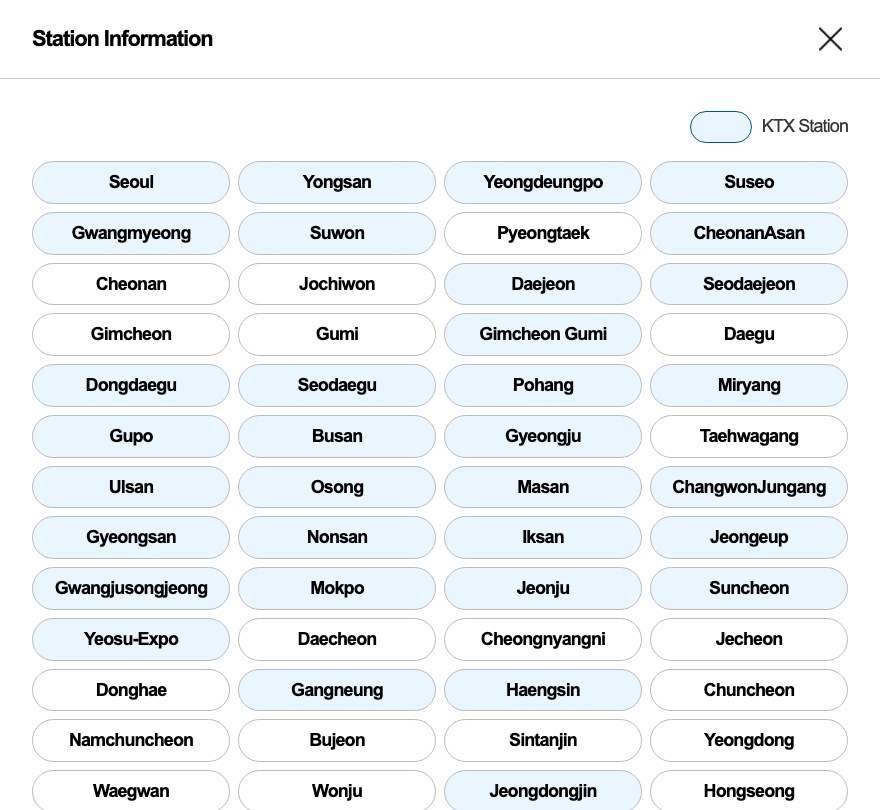
Since September 1, 2026, they run as KTX. Suseo, the old SRT station, is in the station list on Korail’s English booking page.
Is a screenshot of my ticket OK?
No. Korail says captured images and copies are not valid for boarding.
Are other ticket sites safe?
Korail warns against unauthorized resellers and names RailNinja and RailMonster.
What changed in 2026
Guides written before these changes may be out of date, so check the date on anything you read.
August 3: one app. Korail says the KORAIL+ app launched on August 3, 2026, combining the booking apps that used to be separate, Korail Talk and SRT.
September 1: SRT became KTX. According to a government press release on Korail’s site, KTX and SRT have run as one service, KTX, since September 1, 2026. Korail later said you can book all high-speed trains in one search, whether they leave from Seoul, Suseo or Yongsan. The old SRT website still loads, but a pop-up there, in Korean, tells users to book former SRT routes as KTX through KORAIL+.
October 1: two months instead of one. In an October 8 press release, Korail says that, to make booking easier for foreign rail users, it moved the earliest booking date from one month to two months before departure, starting October 1. (The release is in Korean; this is our translation.)
November: more app languages (planned). In the same release, Korail says it plans to expand KORAIL+ from seven to ten languages from November. The App Store lists seven today: English, Japanese, Korean, Simplified Chinese, Thai, Traditional Chinese and Vietnamese.
Korail’s English ticketing guide, its FAQ and its booking page all say two months now. One older notice still says one month: a “PASS details” notice from November 2024 about the KORAIL PASS, which also appears on the English home page. We found no English notice saying whether pass seat reservations moved to two months as well. If you hold a pass, ask Korail before you plan around the earlier date.
If you are looking for former SRT trains from Suseo or Dongtan, see our SRT tickets for foreigners guide for what changed after the merger and where to book them.
Korail’s English site is at korail.com/global/eng. The older address, letskorail.com, now redirects to Korail’s Korean home page, so use the links below instead.
Open the English booking page. It has four fields: Departure, Arrival, Date of departure and Passengers. When we opened it, those field labels were in English, but the hint text in the date box was in Korean.
Pick your stations. The station list marks which stations are KTX stations. Suseo is marked as a KTX station, like Seoul, Yongsan and Busan.
Choose a train and pay by credit card. Korail’s ticketing guide says: “You can pay by credit card.”
Keep the e-mail and password you use for the purchase. Korail says you must enter them “correctly (including the use of uppercase and lowercase letters) to view your ticket.” It recommends “taking notes or memos to help remember your ticketing information.” We did not reach the checkout pages, so we cannot say on which screen the site asks for them.
Find your ticket under MY TICKET. Korail says: “You can confirm your ticket reservations by entering the e-mail address and password you used when purchasing the ticket.”
Korail’s English booking page, October 14, 2026: Suseo, the former SRT station, is marked as a KTX station like Seoul, Yongsan and Busan.
Korail’s English guide describes finding your ticket with an e-mail address and password. We read the whole guide: it does not mention a Korean phone number or a Korail membership, and Korail’s English FAQ explains how to cancel a ticket issued to a “non-member of KORAIL.” We did not reach checkout, so we cannot confirm what the site asks for there. Holiday bookings are different (see below).
For children, Korail’s FAQ says: “Children aged 6 to 13 years old are eligible for a 50% discount on tickets.” Children under 6 get 75% off, up to two per guardian.
Sales close at different times. Korail’s guide says the website sells until departure, ticket machines until 10 minutes before departure, and station counters until departure.
Booking in the KORAIL+ app
The App Store page calls KORAIL+ “the official mobile app of Korea Railroad Corporation (KORAIL).” It also says: “Multiple language support makes train reservation easy and convenient for foreigners.” Korail says the app shows all high-speed trains in one search, and that booking now takes four steps instead of seven.
We did not install the app, so we did not check whether it asks a foreign visitor for a Korail membership or a Korean phone number. Korail’s English ticketing guide and FAQ do not say, and we did not check this on the website’s checkout pages either. What Korail’s English guide does describe is how to find a website booking later: with the e-mail address and password used for the purchase.
Paying with a foreign card
Korail’s guide says you pay by credit card, and its FAQ explains refunds “In the case of overseas cards,” so cards issued abroad are part of the process.
Refunds to an overseas card are slow. Korail says “it takes between two weeks and one month after requesting a refund of the ticket.”
Card tickets are not refunded in cash. Korail says you can switch the payment to another credit card within 30 days from the ticket’s departure date.
If you see Korail’s notice “Temporary Unavailable Foreign Credit Card Services”, check its date. It was posted on August 21, 2026, and it announced that foreign card payments would be suspended for maintenance on “August 24, 2026 (Mon) 03:00 ~ 05:00 (KST)”. On October 14, we found no later card notice in Korail’s English notice list.
Refunds, changes and delays
Korail’s English guide sets out the refund rules:
Before the train leaves, you can request a refund from MY TICKET on the website.
After the train leaves, Korail says “you must request a refund at the train station counter.” Its FAQ says that if you miss the train, you can refund the ticket at a station ticket office before the train’s arrival time.
Korail says: “You cannot request a refund after the arrival time of the train indicated on the ticket.”
The penalty depends on when you cancel. Korail says penalty rates apply at weekends (Friday to Sunday), on public holidays and during traditional holidays.
Korail’s October 8 press release (in Korean) describes two newer rules. You pay no penalty if you refund within 10 minutes of paying; you can use this up to 30 minutes before departure, twice a day. And you can move your trip to a date within seven days before or after the original one without a penalty, up to 30 minutes before departure. Korail’s English guide and FAQ do not mention these two rules, and we did not check whether they apply to bookings made on the English website.
For delays, Korail’s English FAQ says that if a KTX or other train is more than 20 minutes late for reasons that are Korail’s fault, you may claim compensation. The October press release says that when a delay is Korail’s fault, a delay of 90 minutes or more gets 75% of the fare back, and 120 minutes or more gets the full fare back.
On the day: carry the real ticket
Korail says: “Captured images and copied tickets are deemed invalid, and cannot be used to board a train or canceled tickets.” Keep the ticket itself ready to show.
If you board without a ticket, Korail’s FAQ says “you will be charged a penalty worth 1 times the standard fare.”
If you lose your ticket, Korail says “you cannot remain on the train, change your journey, or request a refund.” Its guide describes one way out if the purchase can be confirmed using your credit card: you pay the required fares and charges again for a new ticket, Korail confirms that the lost ticket was not used, and you then get a refund minus the minimum penalty.
Avoid unofficial ticket sites
Korail posts a warning on its English site: “Unauthorized websites such as RailNinja, RailMonster, and similar platforms may charge excessive fees and put you at risk of financial loss or even receiving invalid tickets.” Its example for Seoul to Busan in standard class: 43 USD on Korail’s own site and 76 USD from an unauthorized seller. That notice dates from August 2025, before Korail cut KTX fares by an average of 10% in September 2026.
Korail’s FAQ also says you can buy “at other ticketing vendors,” but that answer does not say which ones. Our suggestion: compare a third-party price with Korail’s own site before you pay.
Booking around Chuseok and Seollal
Big holidays work differently. For Chuseok 2026, Korail ran a separate holiday reservation. Its English notice said: “Membership registration is required.” It also said holiday reservations were “not available at station counters,” and “Non-members must complete payment immediately when purchasing remaining seats.” Our suggestion: if you travel around Seollal (Lunar New Year) or Chuseok, check Korail’s English notice list well before the trip.
Help in English
Korail’s call center is +82-1599-7777. The site’s footer and contact page give 08:00 to 20:00, but its FAQ says the English line is open 08:00 to 22:00. Our suggestion: call between 08:00 and 20:00 Korea time.
The Korea Travel Helpline is 1330 in Korea, or +82-2-1330 from overseas.
We did not buy, reserve, change or refund a ticket for this guide, and we did not enter a name, e-mail address, password or card number. On October 14, 2026, we opened Korail’s English booking page and its station list in a fresh browser. When our automated browser pressed Search, the site blocked it as possible “macro usage”, so we did not see the train list, the seat map or the payment pages. Rules from Korail’s Korean press releases are our translation, and we say where Korail’s English pages do not mention them. Train rules and notices change, so check Korail’s English site before you rely on this guide.
Checking your phone’s settings, step by step (illustration made with web ChatGPT).
Short answer: when a travel eSIM shows No Service, or has bars but no internet, in Korea, check your phone’s settings before you assume the eSIM is broken. Holafly’s general troubleshooting guide puts it this way: “If your eSIM is not working, the fix is usually one of four things: data roaming is switched off, the eSIM isn’t set as your active data line, the APN settings are wrong, or your phone is locked to a carrier.” Airalo, Holafly and Klook each give the same kind of checklist in their help pages. Below, we put their steps in one order. One rule comes first: do not delete the eSIM while you troubleshoot.
Last checked: October 13, 2026. We read the troubleshooting pages of Airalo, Holafly and Klook, Airalo’s and Holafly’s South Korea pages, and Apple’s support pages. We did not buy, install or test any eSIM for this guide. If you have not bought an eSIM yet, start with our guide to choosing a Korea eSIM.
Quick answers
What you see
Possible causes
What to try
No Service or Searching
You have just landed, the eSIM line is off, or the phone has not picked a network
Wait a minute after landing, then work through Steps 2 to 5 below
Bars, but no internet
Data roaming is off for the eSIM, or your home SIM is still the data line
Make the eSIM the data line and set Data Roaming as your seller says. On Android, turn your home SIM off first
Still no internet after that
The APN may need to be entered by hand
If your seller’s instructions list an APN, enter it exactly
An error while installing
The phone is carrier-locked, already holds too many eSIMs, or the eSIM was installed elsewhere
On an iPhone, check Carrier Lock under Settings > General > About
It worked, then stopped or slowed
Your data or days may have run out, or the signal is weak
Check the remaining data in your phone’s settings
Before you start: do not delete the eSIM
This is the step that can turn a settings problem into a new purchase.
Holafly: “Your eSIM card for South Korea can’t be transferred or reinstalled once it’s installed.”
Klook: “Please be careful not to remove the eSIM once you’ve activated it.” If you remove it after you started using it, Klook says “you won’t be able to restore it and will need to purchase a new eSIM.”
Airalo says deleting the eSIM removes it from your device, and you cannot use packages on that line until you add the eSIM again.
The same goes for the iPhone’s “Delete All eSIMs” reset. Apple says that after it, “You will need to set up a new eSIM or physical SIM card to connect to a cellular network.” Our suggestion: if you want the eSIM out of the way, turn the line off instead of removing it.
Step 1: Are you in Korea, and has it had a minute?
Airalo and Holafly both tie activation to being there. Airalo’s troubleshooting page says: “Verify that you have arrived in your destination country—packages only activate within covered regions.” Holafly’s Korea page says: “The Holafly data plan will only be operational once you arrive at your destination.”
Right after landing, give the phone time. Holafly says: “If you’ve just landed, give it a minute to find a local network before trying anything else.”
Step 2: Is the eSIM line turned on and set as the data line?
An installed eSIM can sit there switched off. On an iPhone, open Settings > Cellular, tap the eSIM line, and check that the line is on. Apple says: “If the cellular line is off, tap Turn On This Line.”
Then make the eSIM your data line. Airalo’s iPhone steps say: “Go back to Cellular/Mobile Data and select your eSIM as the data line.” Klook’s checklist for Android says: “Double-check if you selected the eSIM as your mobile network.”
Airalo also tells iPhone users to switch one more setting off: “Turn Allow Cellular Data Switching off.”
Step 3: Is Data Roaming set right for the eSIM line?
This is the setting all three sellers name. First, keep your home line from roaming. Airalo explains the difference between phones: “For iOS devices, you can turn on data roaming for individual SIMs — make sure it’s turned off for your primary SIM to avoid roaming charges.” On Android, Airalo says “data roaming usually applies to all SIMs in use — make sure you have your primary SIM turned off to avoid roaming charges.”
So on an iPhone with two lines, change roaming on the eSIM line only. Apple’s path is: turn on Cellular Data, “tap the number you want to modify, then tap Cellular Data Options.” On Android, turn your home SIM off before you turn roaming on.
Then set roaming for the eSIM as your seller says:
Holafly’s Korea page: “To ensure that your eSIM gets the best coverage, you must turn on data roaming on your phone’s settings.” Its general guide adds: “Then go to your eSIM profile and make sure data roaming is turned on there as well.”
Klook: “Make sure the data roaming is turned on: toggle on “Data Roaming” from the eSIM settings.”
Airalo: its newer troubleshooting page says, “In your device settings, make sure Data Roaming is turned on for your eSIM line.” Its older iPhone page says to “Toggle Data Roaming ON or OFF as instructed in your Airalo app,” so check what your plan’s instructions say.
Step 4: Restart the connection
Turn Airplane Mode on, wait, and turn it off. Apple says: “If your cellular network is available, you might be able to reconnect by turning Airplane Mode on and off.” Airalo’s “New Airalo” troubleshooting page says to keep Airplane Mode on for 10 seconds, and its page on slow internet says to wait 30 seconds. Our suggestion: wait 30 seconds. If that does not help, restart the phone.
Step 5: Pick the network by hand
If the phone does not settle on a network, turn off automatic selection and choose one yourself. Klook says: “Try turning off the automatic network selection and select the supported carrier manually.” The paths, from Holafly’s guide:
iPhone: Settings > Cellular/Mobile Data > Network Selection > turn off Automatic > select a network.
Android: Settings > Connections/Network & Internet > Mobile Networks > Network Operators > turn off Automatic > select a network.
Which network to pick depends on your plan, so use the one your seller names. Airalo says to “Select the network shown in your Airalo app connection instructions.” On October 13, 2026, Airalo’s South Korea page said: “Operates on the SK network in South Korea.” If your phone shows a different Korean network, switch to the one your plan names.
On Samsung Galaxy phones, Airalo lists choosing the network as step 2, before the APN.
Step 6: Check the APN
Airalo explains: “APN stands for Access Point Name. It tells your device how to connect to the internet.” Holafly says: “In most cases, the APN details fill out automatically when setting up the eSIM.” Not always, though.
Airalo: “Some Airalo eSIMs require you to manually update your APN settings in order to access data.” It adds: “If the APN is not listed, it means your eSIM is configured automatically, and no further action is required.” When there is one, “Enter the APN exactly as shown in your eSIM installation details (all lowercase, no spaces),” and “If it does not connect immediately, restart your device to apply the new settings.”
Holafly: “You’ll receive the correct APN settings via email with your activation QR code.”
We are not listing APN values here. Use the APN given for your own eSIM, from the app or the email that came with your order.
Step 7: Update the phone’s software and carrier settings
Carrier settings (iPhone). Apple says to make sure the phone is connected to Wi-Fi, then open Settings > General > About. Apple says: “If an update is available, you’ll see an option to update your carrier settings.”
“3G” next to the signal bars. Klook says: “If “3G” is displayed beside the signal bar, try upgrading the iOS software to the latest version.”
Step 8: Reset network settings, as a last step
Resetting network settings clears your saved Wi-Fi networks and passwords and your APN settings, according to Airalo. Airalo says: “you should only reset your network if you’re comfortable reentering all of the listed settings.” On an iPhone, Apple’s path is: “Tap General, tap Transfer or Reset iPhone, then tap Reset,” then choose Reset Network Settings. Do not choose Delete All eSIMs.
After the reset, check Data Roaming again. Apple’s own page on the reset says: “Cellular data roaming may also be turned off.” If it is off and your plan needs it on, set it again as in Step 3. If your eSIM needed an APN in Step 6, enter it again too.
If it fails while installing
Klook’s help page lists three error messages and what they mean:
“Cellular Plans from This Carrier Cannot be Added”: “Your device might be locked to a specific carrier.” On an iPhone, check Settings > General > About > Carrier Lock. Klook says it should read “No SIM restrictions.” Airalo says carrier locks “will prevent your eSIM from being set up or connecting,” and Klook says to “contact your original carrier” about it.
“Unable to Complete Cellular Plan Change”: “Please double-check if your device has reached the maximum eSIM capacity and remove unnecessary eSIMs.” Remove old eSIMs you no longer need, not the new one.
“This code is no longer valid”: “Please make sure that the eSIM has not been already installed on another device.”
If it worked, then stopped or slowed
Out of data or days. Klook says: “You may have used up all your data.” Holafly’s Korea page says: “If you use all your data or run out of days, your eSIM card will no longer work and you will lose internet connection.” Klook also warns: “The data balance displayed in your booking details is not updated on a real-time basis.” It says: “Please double-check if you have remaining data from the device’s settings.”
Weak signal or a busy network. Klook suggests you “Move to a less-crowded space or a location with a better signal.” Airalo lists “Carrier prioritization (local carriers may give priority to their own users)” as one reason a travel eSIM can be slower.
Holafly’s coverage note for Korea says coverage may be “more limited or unstable on high-mountain trails.”
What the status in the app means (Airalo)
Airalo’s app shows two statuses that help you see where you are stuck:
Installed: “The eSIM profile has been successfully downloaded and configured on your device.”
In Use: “The eSIM has successfully connected to a mobile network and initiated a data session.”
Our suggestion: if it says Installed but not In Use, go back to Steps 1 to 6.
When to contact the seller
If you have done Steps 1 to 8 and it still does not connect, contact the seller before you delete anything.
Airalo: “please contact us via chat in the app or on the website.”
Holafly: its Korea page says, “Our eSIMs generally work fine, but if you experience connection issues, we can provide you with a full or partial refund.”
Have your phone model, what the status bar shows, and which steps you already tried. If an app’s text-message code does not arrive, check whether your plan includes texts at all. Airalo says: ““Data Only” plans do not include calls and texts.” Our guide to choosing a Korea eSIM covers which eSIMs come with calls and texts.
If you would rather change to a physical card, read our Korea SIM card guide first.
What we did not test
We did not buy, install or activate any eSIM for this guide, and we did not try these steps on a phone in Korea. The steps and quotes come from the help pages of Airalo, Holafly, Klook and Apple, read on October 13, 2026. Where we explain why a step matters or suggest an order, that is our reading. The iPhone and Android paths differ, and menu names can vary (Airalo writes “Select Cellular (or Mobile Data).”), so follow your seller’s instructions for your own plan when they differ from this guide.
Subway, bus and train fares in Korea, by card or in cash (illustration made with web ChatGPT).
Short answer: in Seoul, an adult subway ride costs 1,550 won with a transit card for up to 10 km, and the city’s blue and green buses cost 1,500 won. That is from the subway operator, Seoul Metro, and the Seoul city government, and the subway price has been in force since June 28, 2025. A single-journey subway ticket costs 1,650 won, plus a 500-won deposit you get back. Switch between subway and bus within 30 minutes, with a card, and you pay one base fare for the first 10 km of the whole trip. Seoul is our main example because most visitors start there; in Busan, the subway costs 1,600 won by card for up to 10 km, and a regular city bus 1,550 won by card.
Last checked: October 11, 2026. We read the fare pages of Seoul Metro, the Seoul city government, AREX, Tmoney, Busan Transportation Corporation, the Busan city government, Korail and the express bus booking site Kobus, cited below. We did not buy, top up or ride with a transit card for this guide. Fares change, so check the operator’s page before you budget.
Quick answers
Ride
Adult fare
How you pay
Seoul subway, up to 10 km
1,550 won by transit card · 1,650 won single-journey ticket (+500-won deposit, refunded)
Card, or ticket machine
Seoul subway, longer rides
+100 won per 5 km from 10 to 50 km, then +100 won per 8 km
Same
Seoul trunk (blue) and branch (green) bus
1,500 won
Card or cash (no cash on cashless routes)
Seoul local (village) bus
1,200 won
Card or cash
Seoul rapid (red) bus
3,000 won
Card or cash
Seoul owl (late-night) bus
2,500 won
Card or cash
Subway–bus transfer
No extra base fare for the first 10 km if you board within 30 minutes (60 minutes from 9 p.m. to 7 a.m.)
Transit card only, tapped on and off
AREX, Seoul Station to Incheon Airport Terminal 1
All-stop train 4,750 won by card · Express train 13,000 won
All-stop: card, or ticket for 100 won more
Seoul taxi (regular)
4,800 won for the first 1.6 km, daytime
Meter
Climate Card short-term pass (Seoul)
1 day 5,000 won · 3 days 10,000 won · 7 days 20,000 won, plus 3,000 won for the card
Cash or card at station machines
Busan subway, up to 10 km
1,600 won by card · 1,700 won single-journey QR ticket
Card, mobile or QR ticket
Busan city bus (regular)
1,550 won by card · 1,700 won cash
Card or cash
KTX, Seoul to Busan, standard class
54,400 won (Korail’s fare table from September 1, 2026)
Korail website or app
Express bus, Seoul to Busan
29,100 won standard · 43,300 won premium seat (one weekday in October 2026)
Kobus website or terminal
1. Seoul subway: 1,550 won for the first 10 km
Seoul Metro’s fare page gives the adult fare with a transit card as “Basic Fare : 1,550 won up to 10km.” Longer rides add a little: “Between 10 and 50km: 100 KRW added for every 5km” and “Beyond 50km: 100 KRW added for every 8km.”
Seoul Metro’s notice on the change says, in Korean, that the base fare was adjusted from the start of service on Saturday, June 28, 2025. The Seoul city government’s English transport page shows the before-and-after under the heading “Subway fares (as of Sat, Jun. 28, 2025)”: an adult fare of 1,400 won by card became 1,550 won, and the single-ride fare went from 1,500 to 1,650 won.
Single-journey tickets. If you have no transit card, the station machines sell a single-journey ticket. Since March 17, 2026, the Seoul city government says, foreign visitors can buy them with cards issued abroad at the new machines in Line 1 to 8 stations. Seoul Metro’s English page puts the adult fare at “1,650 won (up to 10km), no discount rate,” and that adult price covers teens too. Its ticket guide says to “insert the fare plus the deposit of 500won,” and that “you can obtain a full refund for the deposit from a ‘Deposit Refund Device’ at your destination station.”
Early-morning discount. Seoul Metro’s Korean fare page says that if you board with a transit card between the start of service and 6:30 a.m., you get 20% off the base fare, unless you are transferring from another mode.
Kids and teens. On Seoul Metro’s fare table, a child aged 6 to 12 pays 550 won for the first 10 km, by card or single-journey ticket, and children under 6 ride free, up to three with one adult. Teens have a 900-won transit-card fare, but a teen with a single-journey ticket pays the adult 1,650 won. On buses, the city’s Korean bus page says the teen discount applies only to a teen transit card that has been registered.
2. Seoul buses: 1,500 won on blue and green routes
The Seoul city government’s English transport page lists “Bus fares (as of 3 AM on Sat, Aug. 12, 2023),” and its Korean bus page shows the same fares. For an adult, card and cash cost the same:
Trunk (blue) and branch (green) buses: 1,500 won.
Circulation (yellow) buses: 1,400 won.
Local (village) buses: 1,200 won.
Rapid (red) buses, which link Seoul with the wider metropolitan area: 3,000 won.
Owl (late-night) buses: 2,500 won.
The city also gives an “Early morning discount (20% off when using a card before 6:30 AM, excl. owl bus),” which makes a trunk or branch bus 1,200 won.
Cashless buses. Some Seoul routes do not take cash. The city keeps a list of cashless bus routes, in Korean, dated January 2026, and it runs to 183 numbered routes. A 2024 Seoul city explainer says that if you board one without a transit card, you are told to ride first and pay the fare later by bank transfer or mobile Tmoney. For a visitor, a transit card avoids that problem.
3. Transfers: why a card saves money
Seoul’s fare system counts a subway-and-bus journey as one trip. Seoul Metro’s Korean fare page says the first 10 km of a combined journey costs one base fare with free transfers, and that you pay the highest base fare among the modes you used. Beyond 10 km, it adds 100 won for every 5 km. If one of your rides is a red (rapid) bus or a similar express bus from Gyeonggi or Incheon, the free distance is 30 km instead.
Three conditions, all from the Seoul city government and Seoul Metro pages in Korean:
Time. Board the next bus or train within 30 minutes of getting off the last one. From 9 p.m. to 7 a.m., the window is 60 minutes.
Count. The discount covers up to five rides in a row.
Card, both ways. The transfer discount works only when you pay with a transit card, and you must tap the card when you get on and when you get off. If you do not tap off, you lose the free transfer and each ride is charged separately.
Re-boarding the same bus, or another bus on the same route, does not count as a transfer, according to the city’s bus page.
A 2026 rule about tapping off. Seoul Metro posted a notice, in Korean, saying that from the first train on Saturday, March 7, 2026, riders who use only the subway and do not tap out will be charged an extra subway base fare on top of their next ride.
4. Getting a transit card
Seoul’s English transport page lists the prepaid cards that work on buses: “Type: Tmoney, Cashbee, Hanpay, Rail+, Onepass, etc. Vendors: Convenience stores and bus card charging stations nationwide.” Tmoney is the one most visitors meet.
What the card costs. The card itself is separate from the money on it. Tmoney’s Korean card page lists a plain card at 3,000 won, and its Tmoney Travel Card, aimed at visitors, at “Price : 4,000 KRW (Korean currency) Stores : Convenient stores & bus ticket office in Incheon airport.” The regular Tmoney card is also sold at customer centers in Seoul subway stations, according to Tmoney’s Korean purchase guide.
Topping up.Tmoney’s guide for foreigners says: “Present your Tmoney card and cash (in Korean won) for top-up in Tmoney sales locations.” It adds that you can top up “in the unit of ₩1,000, in the range of ₩1,000 to ₩90,000.” Tmoney’s Korean guide says topping up with a credit or check card works only with cards issued by Woori Bank, at Woori ATMs and GS25, so bring some won in cash.
Getting money back. The same English guide says leftover money is refunded “in cash in Korean won,” that “Refund does not include the cost of card,” and that “The service fee of ₩500 will be charged.” Tmoney’s Korean refund guide adds limits at convenience stores: under 20,000 won at GS25, up to 20,000 won at 7-Eleven, independent stores and some kiosks, and up to 30,000 won at CU and emart24.
On an iPhone, Mobile Tmoney is an option; our travel apps guide notes that “Mobile Tmoney’s iPhone listing says no sign-up is required,” but also that “Apple Pay Tmoney balance refunds can only be requested through the Mobile Tmoney app, to a bank account in your own name.”
5. A pass for short stays: the Climate Card
Seoul’s Climate Card has short-term passes for unlimited rides. The Seoul city government’s Korean page lists them at 5,000 won for 1 day, 8,000 won for 2 days, 10,000 won for 3 days, 15,000 won for 5 days and 20,000 won for 7 days. The physical card costs 3,000 won on top, according to Tmoney’s Korean guide.
What to know before you buy, from the same Seoul page and Tmoney’s guide, both in Korean:
It starts the day you load it. The pass begins on the day you charge it, from the first train, and you cannot load it in advance.
Seoul only, from October 1, 2026. The page lists the range as subway within Seoul plus getting off at Incheon Airport Terminals 1 and 2, and Seoul-licensed city and village buses, including late-night and circulation buses. It excludes the Sinbundang Line, GTX, subway outside Seoul, intercity and airport buses, and buses licensed by other regions. Seoul’s bikes (Ttareungi) and the Hangang Bus are not included, and Seoul’s FAQ says it cannot be used in taxis.
Where to buy. The page lists the new transit-card machines in Seoul Metro Line 1 to 8 stations, and convenience stores near Line 9, Ui-Sinseol Line and Sillim Line stations. Seoul’s FAQ says that since March 17, 2026, those machines in Line 1 to 8 stations accept credit and debit cards issued abroad for Climate Card short-term passes. Seoul’s English announcement says “an average service fee of approximately 3.7% will apply.”
Use the physical card. Seoul’s FAQ says the mobile version needs identity verification with a phone in your own name, and without it you must use the physical card.
Refunds take effort. The Seoul page says the refund is the amount charged minus what you used minus a 500-won fee, requested before the pass expires, and that foreigners without a Korean bank account must visit Tmoney’s head office for a cash refund. Tmoney’s English guide for foreigners names the place as the T-Town Customer Center on the first floor of Seoul City Tower, 110 Huam-ro, which is also the business address on Tmoney’s website. That guide says a passport may be required, and adds: “Visit the T-Town Customer Center 3 business days after you apply to receive the refund in cash.” If you may want a refund, allow for two visits.
Seoul has also ended the 30-day version. Its FAQ says the 30-day pass could be loaded until August 31 and used until September 29, and that the short-term pass will keep running, for use in Seoul only.
6. From Incheon Airport
AREX runs two kinds of trains between Incheon Airport and Seoul Station. On AREX’s all-stop fare table, the adult transit-card fare from Seoul Station is 4,750 won to Terminal 1 and 5,350 won to Terminal 2, and AREX notes, in Korean, that a single-journey ticket costs 100 won more for adults. For the non-stop Express train, AREX lists the adult fare as 13,000 won, next to a “regular fare” of 18,500 won to Terminal 1 and 19,100 won to Terminal 2.
For every way into the city, including airport buses, taxis and late-night buses, with travel times and last trains, see our guide to getting from Incheon Airport to Seoul.
7. Taxis
Seoul’s fare page lists, in Korean, the regular (mid-size) taxi fare from February 1, 2023: 4,800 won for the first 1.6 km, then 100 won for every 131 m or every 30 seconds. Late at night it costs more. The city’s English page lists a surcharge of “20% (10 PM–11 PM) / 40% (11 PM–2 AM) / 20% (2 AM–4 AM),” with the first 1.6 km at 5,800 won or 6,700 won. Our Kakao Taxi guide covers calling a taxi by app, and notes that Kakao Mobility says k.ride lets you check the estimated fare before you call.
8. Busan
Busan has its own fares. Busan Transportation Corporation’s fare page, in Korean, splits the subway into two sections: Section 1 is up to 10 km from your boarding station and Section 2 is longer. For an adult, Section 1 costs 1,600 won by transit card and 1,700 won with a single-journey QR ticket; Section 2 costs 1,800 and 1,900 won. The Busan city government’s page dates these fares to May 3, 2024.
Busan’s bus fare page lists a regular city bus at 1,550 won by card and 1,700 won in cash for an adult, from October 6, 2023.
Transfers work differently. Busan Transportation Corporation’s transfer page says you must board the next vehicle within 30 minutes of getting off, and allows up to two transfers. Its example for an adult: subway then bus costs 1,600 won plus 0 won; bus then subway costs 1,550 won plus 50 won. Either way, 1,600 won.
Your Seoul card works. The Busan city government’s card table lists Tmoney (Seoul) as accepted on Busan’s subway and buses.
A subway-only pass. Busan Transportation Corporation lists a mobile subway pass at 6,000 won for 1 day and 13,000 won for 3 days, and says it cannot be used on buses, the Donghae Line or the Busan–Gimhae light rail. Its ticket page says foreigners can use the app without signing up by entering an email address and a verification code.
9. Between cities
KTX high-speed train. From September 1, 2026, the KTX and SRT high-speed trains run as one service, KTX, after Korail merged with SR, according to a government press release on Korail’s site, in Korean. Korail says that with the merger, KTX fares fell by an average of 10%. On Korail’s KTX fare table dated September 1, 2026, the Seoul–Gyeongju–Busan sheet lists Seoul to Busan at 54,400 won for an adult in standard class, and from Suseo Station it is 52,900 won. These are base fares from the table; we did not check the price of individual trains in Korail’s booking app.
Express bus. We ran a timetable search on Kobus, the express bus booking site, on October 11, 2026, for a Tuesday, October 13 departure from Seoul’s Gyeongbu terminal to Busan. It showed adult fares of 29,100 won for a standard bus, 43,300 won for a premium-seat (udeung) bus and 56,200 won for a premium bus. A late-night premium-seat bus cost 51,900 won.
If you see 59,800 won for the KTX to Busan in a guide, that number appears in a Korail press release from 2015; the current table says 54,400 won.
These are our sums, using the adult fares above and assuming each trip in Seoul stays within 10 km:
A light day, by transit card: three trips at 1,550 won is 4,650 won, even if one of them is a subway ride followed by a blue or green bus within 30 minutes, because that counts as one trip at the higher base fare, the subway’s.
The same day without a card: three single-journey subway tickets at 1,650 won plus 1,500 won in cash for the bus, since there is no transfer discount, is 6,450 won, plus a 500-won deposit on each ticket that you get back.
The card itself: a plain Tmoney card costs 3,000 won once, and Tmoney does not refund the card’s price. On your first light day, 4,650 won plus 3,000 won is 7,650 won, more than the 6,450 won without a card. By the second light day, the card has paid for itself: 12,300 won against 12,900 won.
A busy three days: four trips a day at 1,550 won is 18,600 won on a Tmoney card. A 3-day Climate Card is 10,000 won plus its own 3,000-won card, or 13,000 won.
So if you will ride on more than one day, a regular transit card is cheaper than single tickets. A short-term Climate Card pays off when you ride a lot, inside Seoul, over the days you load it for.
FAQ
Can tourists use a T-money card? Yes. Tmoney sells a Tmoney Travel Card for visitors at 4,000 won, at convenience stores and the bus ticket office at Incheon Airport, and its guide for foreigners explains how to top it up with cash in won.
Can I pay with a foreign credit card? For single-journey tickets and Climate Card short-term passes, yes: the Seoul city government says “Internationally issued credit and debit cards, such as Visa and Mastercard, will now be accepted at 440 new transit card vending machines installed at 273 subway stations on Lines 1–8 across the city,” with an average fee of about 3.7%. For topping up a regular Tmoney card, Tmoney’s Korean guide names only Woori Bank cards, so plan to use cash.
Is it cheaper to use a card than cash? On the subway, yes: 1,550 won by card against 1,650 won for a single-journey ticket in Seoul, and only card users get the transfer discount. The card itself costs 3,000 won or more, once. On Seoul’s trunk and branch buses, an adult pays 1,500 won either way.
Why some guides still say 1,400 won
As of October 11, 2026, the subway table on Visit Seoul’s transportation page, a site that calls itself “The Official Travel Guide to Seoul,” still shows “General (19 years & up) 1,400 1,500” under a note “Starting from October 7, 2023.” Those were the fares before June 28, 2025. The bus and taxi fares on the same page match the current ones. If a guide quotes 1,400 won for the subway, it is using the old fare.
What we checked and what we didn’t
We read the fare pages of Seoul Metro, the Seoul city government, AREX, Tmoney, Busan Transportation Corporation, the Busan city government, Korail and the express bus booking site Kobus on October 11, 2026, and quote them above. Several of those pages are in Korean; we say so where it matters. We did not buy, top up or ride with a transit card for this guide, and we did not check fares in other cities. We found no official notice of a fare change in Seoul in 2026 other than the tap-out rule, but fares do change, so check the operator’s page before you budget.
What each Korea travel app asks for: a phone number, a card or an account (illustration made with web ChatGPT).
Short answer: Korea’s tourism board, the Korea Tourism Organization (KTO), keeps a list of recommended travel apps, and says the page was last updated in August 2026. We do not rank them. Instead, this guide sorts the main ones by what they ask of a visitor: a Korean phone number, a card or an account. For maps, our earlier side-by-side guide points English readers to NAVER Map first, with KakaoMap as a second opinion. For taxis, KTO says k.ride can be registered with a phone number, email, Google or Apple account, while Kakao T asks for identity verification through your mobile phone. Mobile Tmoney’s iPhone listing says no sign-up is required, and Shuttle and Catchtable’s global app say you do not need a Korean phone number. Where we have already tested an app, we link the guide that reports what we saw.
Last checked: October 10, 2026. We read KTO’s “Helpful Apps & Resources” page and the operators’ own pages and App Store listings cited below. We did not install, sign up for or pay in any app for this guide. Hands-on results come from our earlier guides, and each one gives its own test date.
Quick answers
App
Use it for
Sign-up and phone number
Paying
NAVER Map
Maps and directions
Saving places needs a NAVER account, and NAVER’s sign-up asks for a mobile number that can receive a text message
—
k.ride
Taxis, for international visitors only
Phone number, email, Google or Apple account (KTO)
Cards from overseas and Alipay+ (KTO)
Kakao T
Kakao Taxi
Identity verification through your mobile phone
Visa, Mastercard, JCB and American Express cards issued outside Korea, per Kakao T’s help center
KORAIL+
Train tickets
The foreign website retrieves bookings with the e-mail address and password used at purchase
A Korail Pass needs a valid passport and a credit card
Mobile Tmoney (iPhone)
Buses and subways
“No sign-up required” (iPhone listing)
Top-up needs a credit or debit card added to Apple Pay
WOWPASS
Prepaid card for exchange, payment and transit
—
Mobile top-up: “Mastercard, JCB, VISA(Paypal) supported”
Papago
Translation
—
—
Shuttle
Food delivery
No Korean phone number needed: sign up with an email
International and Korean credit cards, PayPal, KakaoPay (App Store listing)
Catchtable (global app)
Restaurant bookings
“No Korean phone number required”
Email and credit card
Emergency Ready app
Disaster alerts, shelters, first aid
—
—
1330 Korea Travel Helpline
Travel questions by phone or chat
—
—
1. Maps: NAVER Map, with KakaoMap as a second opinion
KTO says “Naver Maps is the most widely used online map among Koreans.” Our guide to NAVER Map for foreigners says: “Foreigners can switch NAVER Map to English, and NAVER’s Google Play listing says its maps and driving navigation are provided in English.”
Our earlier side-by-side guide compared the two big maps on their desktop sites: “NAVER put the place we meant first 9 times; KakaoMap did 4 times” out of ten English searches. Our advice from that guide: “If you read only English, start with NAVER Map and keep KakaoMap as a second opinion.” The full results are in NAVER Map vs KakaoMap. For planning on a computer, see our guides to the NAVER Map desktop site and the KakaoMap desktop site.
What the map asks of you:
An account to save places. Our bookmarks guide reports: “You need a NAVER account to save: without signing in, NAVER’s save buttons sent us to the sign-in page.”
A phone number for that account. Our NAVER sign-up guide says the sign-up page “works in English and asks for a mobile phone number that can receive a text message.”
A passport check for some services. Our NAVER Map guide says that “since June 4, 2026, Passport Verification has given visitors with a non-Korean passport access to supported booking, ordering, and payment services in NAVER Map without a Korean mobile number.” If it fails, see NAVER passport verification not working.
A data connection. Our offline guide, which tested the iPhone app, reports that with the internet off, the app “opened to a warning saying NAVER Map needs an internet connection and would not show the map.”
2. Taxis: k.ride or Kakao T
KTO lists k.ride, which it calls “a mobility service exclusive to international visitors.” KTO says: “The application can be easily downloaded via Android or iOS and registered via phone number, email, Google, or Apple account.” It adds: “Users can use credit cards from overseas as well as simple payment apps including Alipay+.”
Kakao T is not on KTO’s list, but our Kakao Taxi guide notes that “Kakao Taxi is booked in the Kakao T app, and its US App Store listing includes English among the app’s languages.” The same guide says: “The catch is signing up: Kakao T asks for identity verification through your mobile phone, and its help center does not explain how a visitor does that.” For payment, it says Kakao T’s help center “says the app accepts cards issued outside Korea from Visa, Mastercard, JCB and American Express for taxis.”
The two are linked: our guide says Kakao Mobility “also runs k.ride, an app for foreign visitors that lets you sign up with Google, Apple or email and calls Kakao T taxis.”
3. Trains: KORAIL+ and the Korail Pass
KTO says: “The Let’s Korail website and Korail+ app are the official train ticket platforms operated by the Korea Railroad (KORAIL).” On the App Store, the app now appears as KORAIL+: “KORAIL+ is the official mobile app of Korea Railroad Corporation (KORAIL).”
KORAIL’s English site says: “You can buy tickets via the KORAIL website (www.korail.com), KORAIL+ (mobile app), ticket vending machines, and train stations (not available at subway stations).” For bookings made on that site, it says: “You can confirm your ticket reservations by entering the e-mail address and password you used when purchasing the ticket.”
If you plan to ride trains a lot, look at the Korail Pass. KORAIL says: “Any foreigners visiting Korea can travel with the KORAIL PASS.” Before you buy, note three conditions from KORAIL’s pages:
“A valid passport and credit card are required to purchase a KORAIL PASS.”
“All information must match exactly with the information on the passport.”
“You cannot board SRT trains, metropolitan subway trains, and special tourist trains with a KORAIL PASS.”
KTO says the pass “can be purchased at the Let’s Korail website, designated tour agencies, and Korail Tourist Information Center in Seoul, Yongsan, and Busan Stations.”
4. Transit cards and money: Mobile Tmoney, WOWPASS and GoHanpass
Mobile Tmoney. KTO describes it as “A mobile transportation card app that lets you use public transit with your smartphone, without a physical card.” Its iPhone listing, published by Tmoney, says: “Just tap your iPhone or Apple Watch and ride instantly.” The same listing says “No sign-up required” and “A credit or debit card added to Apple Pay is required for top-up.” It needs an “iPhone XS / XR or later with iOS 17.2 or later.” One catch from Tmoney’s own blog: “Apple Pay Tmoney balance refunds can only be requested through the Mobile Tmoney app, to a bank account in your own name.” The iPhone listing does not say which card brands work for top-up, so check before you rely on it.
WOWPASS. Its App Store listing calls it “an all-in-one prepaid card for foreign travelers in Korea, covering money exchange, payment, transportation, and brand rewards.” KTO says: “You can add and withdraw funds at exchange kiosks or through the WOWPASS app.” WOWPASS’s guide says its balance can be used at shops in Korea that accept local credit or debit cards, “even at stores that do not accept international credit cards,” and that “The Tmoney balance needs to be topped up separately from WOWPASS balance.”
GoHanpass. KTO says it “supports both transportation and payments during your travels in Korea, with easy sign-up using your passport.” Its operator, Hanpass, says you can “Top up your wallet in KRW using international cards, global wallets, convenience stores, or ATMs.” Its App Store listing says to pick up the transit card at “Incheon Airport, KT Roaming Centers and selected locations.”
Seoul Bike. KTO lists Seoul’s public bikes, run by the Seoul Metropolitan Government. The Seoul Bike site says, in Korean, that you can use it without signing up, and that in the Foreigner mode a credit card must be issued outside Korea. The same page says non-members can choose a 1-hour or 2-hour day pass, while KTO says the Daily Ticket “offers flexible time limits of 1, 2, or 3 hours,” so check the app before a long ride. Seoul’s English site warns: “If not returned within 4 hours (general) or 6 hours (premium), it is considered to have been stolen or lost and will be reported to the police.”
5. Talking: Papago and KakaoTalk
KTO says: “Papago is the most widely used online translator app among Korean speakers.” It says Papago “can also recognize and extract texts from different sources such as images, handwritings, webpages, and words spoken out loud.” Papago’s App Store listing, published by NAVER, says it supports 14 languages, and adds: “Use text translation even without an internet connection.”
KakaoTalk is not on KTO’s list either. Our KakaoTalk verification guide says “KakaoTalk is available in 230 officially registered international country codes,” and that “Kakao warns that repeated attempts can restrict you.”
6. Food: Shuttle, Baemin and Catchtable
Shuttle.Its App Store listing says: “No Korean Phone Number Needed – Sign up with just an email, phone verification is optional (but required for using Shuttle credit).” It says you can “Pay with major international/Korean credit cards, PayPal, KakaoPay,” while Shuttle’s FAQ is narrower: “We accept payment by all major credit cards and Korean debit cards.” Check the payment options in the app before you order. Two more catches: “Menu content is currently available in English and Korean only,” and Shuttle’s website says it serves “Seoul, Osan, Pyeongtaek, Daegu, and Busan.” Its FAQ also says that once the restaurant confirms your order, “you will receive a text message to the phone number linked to your account with an approximate delivery time.”
Baemin. Our food delivery guide says: “In August its operator said foreigners can order without signing up after verifying an overseas phone number by text message.”
Catchtable. KTO calls it “a booking platform for saving seats at restaurants.” Its global App Store listing says “No Korean phone number required” and “Pay easily with your existing email and credit card.” On Android, Catchtable’s global app is a separate Google Play listing, so check that you install the global one.
7. Help and emergencies: Emergency Ready and 1330
KTO says: “The Emergency Ready app is a multilingual emergency guide made by the Korean government.” “It provides disaster alerts and information on civil defense shelters, emergency medical centers, police stations, fire stations, embassy information, and safety guides.” Seoul’s city site says the Ministry of the Interior and Safety “provides prompt and accurate disaster information in 22 languages, including English, Chinese, and Japanese.” The app’s US App Store listing, published by the ministry, shows only English in its language field, so the 22 languages may describe the ministry’s disaster information rather than every screen of the app.
KTO describes the 1330 Korea Travel Helpline as “a telephone and real-time chat service.” The number is “1330 (in Korea), +82-2-1330 (from Overseas).” KTO’s service charter, in Korean, says text chat is offered in Korean, English, Japanese and Chinese, through the 1330 messenger, KakaoTalk, Facebook Messenger and LINE, and that Russian, Vietnamese, Thai and Malay/Indonesian are phone-only, from 8:00 to 19:00.
KTO’s own VISITKOREA app also has a Travel Basics menu where, its listing says, “you can find useful information such as visa and entry requirements, emergency contacts, operating hours of public agencies and tourist police.”
8. Before you fly
These are our suggestions, based on the pages and guides above:
Get a data connection first. NAVER Map, at least, would not show the map offline in our guide’s test. Our eSIM guide says “for maps, messaging and browsing, a data-only eSIM is enough,” but also: “The catch is that a Korean number is not the same as Korean identity verification.”
Sign up for text-code apps while your home number can receive texts. NAVER and KakaoTalk send a code to a phone number.
Choose by sign-up method, not by popularity. If you cannot verify a Korean phone, the apps above that sign up with email, Google, Apple or a passport are the simpler route.
Check the card rule before you top up. Each app names different cards, and Mobile Tmoney’s iPhone refunds go to a bank account in your own name.
What we checked and what we didn’t
We read KTO’s “Helpful Apps & Resources” page, KORAIL’s English site, and the operators’ own pages and App Store listings cited above on October 10, 2026. We did not install, sign up for or pay in any app for this guide. Where a sentence reports what we saw, it comes from one of our earlier hands-on guides, linked in that sentence. App features, sign-up rules and accepted cards change, so check the app’s own page before you rely on it.
Choosing an eSIM before a trip to Korea: data only, or calls and texts too (illustration made with web ChatGPT).
Short answer: for maps, messaging and browsing, a data-only eSIM is enough, and the four travel eSIM sellers we read, Airalo, Holafly, Klook and Nomad, describe their eSIMs as data only. If you also want calls and texts on a Korean line, Korea’s carriers SK Telecom, KT and LG U+ sell eSIMs for visitors that include them, after a passport or entry check; KT and LG U+ say their numbers start with 010. The catch is that a Korean number is not the same as Korean identity verification. SK Telecom says its visitor eSIM cannot receive text messages for personal authentication or payments, and KT says its eSIM does not support personal authentication. LG U+ says its voice and SMS service can receive codes from restaurant and taxi reservation apps, but not identity verification for banking or government services. Below is what each company’s own pages say, so you can choose before you fly.
Last checked: October 9, 2026. We read the visitor eSIM pages of SK Telecom, KT and LG U+, Incheon Airport’s list of roaming centers, the help pages of Airalo, Holafly, Klook and Nomad, and Apple’s support pages. We did not buy, install or activate any eSIM, and we did not try any Korean app with a visitor number.
A note on the search term: an “eSIM card” is not a card. Apple describes an eSIM as “an industry-standard digital SIM built into your iPhone, eliminating the need for a physical SIM card.”
Quick answers
Question
What we found
Is an eSIM a physical card?
No. Apple calls it a digital SIM built into the phone, and Google and Samsung also describe it as a digital SIM rather than a physical card
Do travel eSIM sellers give you a Korean number?
Not in what we read. Airalo, Holafly and Nomad describe their eSIMs as data only, and so does Klook’s general FAQ
Can a visitor get a Korean number on an eSIM?
Yes, from the carriers. KT says all its numbers start with 010, and LG U+ says its Data+Voice eSIM comes with a 010 number. SK Telecom sells a “(Data, Call, SMS)” eSIM. Calls and texts start only after a passport or entry check
Will that number pass Korean identity verification?
SK Telecom and KT say no. LG U+ says codes from restaurant and taxi reservation apps work, but not identity verification for banking or government services
Will my phone work?
It has to support eSIM and must not be locked to a carrier. On an iPhone, check Settings > General > About
Where do I buy one?
Online or at the carriers’ airport roaming centers, but KT sells its eSIM with calls and texts only at its airport roaming center. Incheon Airport lists 24-hour roaming centers of all three carriers on the first floor of both terminals
1. Data-only or a Korean number: which do you need?
A data-only eSIM gives you mobile internet and nothing else. Airalo’s help center says: ““Data Only” plans do not include calls and texts.” It adds that you can usually make calls through messaging apps such as WhatsApp, Telegram and Signal, because those apps use data.
Your home number can keep receiving calls and texts if you leave that line on. Airalo says that to do this, “you need to enable the primary line and set it up as your Default Voice line.” Apple adds a warning: “You might still incur roaming fees from your home eSIM.” Ask your home carrier about the cost before you go.
A Korean number is worth paying for if you want local calls and texts, or if something you plan to use in Korea will send its code to a Korean number. Several apps visitors use ask for a phone number and a text-message code. Our guides to KakaoTalk verification, NAVER sign-up, Kakao Taxi and food delivery apps each cover the phone number question for that app.
A Korean number is not Korean identity verification. Check this before you pay extra for a number. Here is what each carrier says about its visitor eSIM:
SK Telecom: “Receiving text messages related to personal authentication services and payments is not possible.”
KT: “KT eSIM does not support the personal authentication.”
LG U+: “When using Voice/SMS services, SMS verification for restaurant and taxi reservation apps is available, but Identity Verification for banking or government services is not supported.”
LG U+’s setup guide also says its Data+Voice eSIM gives you “a Korean number starting with 010, so you can receive the SMS verification needed to sign up for Korean delivery and taxi-hailing apps.” The carrier pages we read do not name which apps accept a visitor number, and we did not test any.
2. What SK Telecom, KT and LG U+ sell visitors
SK Telecom
KT
LG U+
Data only
A 1-day pass. For 2 days or longer, SK Telecom says to buy its “(Data, Call, SMS)” product
“Data eSIM”, sold online and on site
The QR code comes right after purchase, with no airport visit
Calls and texts
“(Data, Call, SMS)” eSIM. Incoming calls and texts work after passport verification; outgoing calls and texts need a top-up
The eSIM with calls and texts is sold only at KT’s roaming center at the airport. KT says all its numbers start with 010
Data+Voice eSIM with a 010 number
Passport or entry check
Online through the email voucher, 8 AM to 10 PM daily, after you clear immigration. One product per passport
Calls and texts work only after an entry check at KT’s airport roaming center
Visit the airport counter after purchase and show your passport to get the QR code
Who can buy, and how many
Short-term foreign visitors staying 90 days or less. Passport verification for one product per passport
Foreign tourists visiting for a short period (within 90 days). 1 voice SIM and 4 data SIMs per person
Up to 3 items per passport
Install by
Scan the QR code within 180 days of purchase
Within 30 days of purchase (see below)
Activate within 60 days of purchase
A few details from the same pages:
Prices were listed without a date. On October 9, 2026, SK Telecom showed its LTE data-only 1-day plan at 6,500 won, and KT showed 1 day at ₩6,500. Check the current price on the carrier’s page before you buy.
KT’s online entry check: KT posted a notice introducing an online entry check, but its title now reads “(Temporarily Suspended).” KT’s eSIM page says voice and SMS “will be available only after completing Identity Verification(Entry Check) at the KT roaming center in airport.” Plan on the airport counter if you want KT calls and texts.
KT’s install deadline: one line on KT’s eSIM page says “eSIM install is available within 90 days after purchase,” and another says to install within 30 days: “If not installed within 30 days, it will be automatically terminated (No refund).” Install within 30 days to be safe.
KT’s data cap: “After 11GB of data usage on a line in a day, you may still use data service unlimited at the speed of 5Mbps.”
SK Telecom payment: “Payments cannot be made with credit cards or debit cards issued in Korea.”
Deleting the eSIM: SK Telecom says that if you delete the eSIM profile during use, the service ends regardless of the remaining period and you have to buy a new eSIM.
3. Travel eSIM sellers: Airalo, Holafly, Klook and Nomad
These four sellers describe their eSIMs as data only. Airalo’s and Holafly’s lines below come from their Korea pages; Klook’s and Nomad’s come from general help pages:
Airalo: its Korea package page says it “Operates on the SK network in South Korea,” and its help center says data-only plans “do not include calls and texts.”
Holafly: “The South Korea digital eSIM only comes with cellular data.” Its Korea page adds: “It does not include a local phone number for traditional phone calls or text messages, so it is not a South Korea eSIM with a phone number.”
Klook: its general FAQ says: “Since eSIMs on Klook provide only data, make sure to choose a different SIM for receiving the calls.” We could not open Klook’s Korea product pages, so check each listing.
Nomad: “Nomad eSIMs are optimized for data-based services only and do not support traditional voice calls and SMS.”
Two things to check on whichever plan you pick:
When the clock starts. Airalo says that for most of its packages, “the validity period begins when the eSIM connects to a supported network.” Holafly’s Korea page says: “Your plan activates immediately upon connecting your eSIM to any supported network.” Nomad’s help center says both that its eSIM usually starts when it first connects to the local network and, in another article, that “Local plans activate upon installation.” Read your plan’s own terms.
Hotspot. Airalo says you can use a personal hotspot “as long as it is supported by your device and the network.” Holafly’s Korea page says “Share 1 GB of data per day,” while another Holafly article about Korea says “up to 500 MB of hotspot data.” If you need hotspot, ask the seller which applies.
4. Before you fly: will your phone take an eSIM?
eSIM support. Apple lists “An iPhone XS, iPhone XS Max, iPhone XR, or later.” Apple also says: “In China mainland, only iPhone 18 Pro, iPhone 18 Pro Max, iPhone 17e, and iPhone Air support eSIM,” and “In China mainland, Hong Kong, and Macao, certain iPhone models feature Dual SIM with two nano-SIM cards.”
Carrier lock.Apple says: “To use your iPhone with another carrier when traveling internationally, your iPhone cannot be locked to a carrier.” To check, open the Settings app, tap General, then tap About. “No SIM Restrictions” next to Carrier Lock means the phone is not locked. Apple says it cannot remove a carrier lock for you, so ask your carrier before you travel. Airalo says carrier locks “will prevent your eSIM from being set up or connecting,” and SK Telecom says its eSIM works only on phones without “country lock restrictions for overseas SIM use.”
LG U+ and some Android phones. LG U+ says: “Google Pixel, Motorola, and OPPO devices cannot use LG U+ eSIM.” If you plan to use SK Telecom or KT with one of these phones, check with that carrier first.
If your phone cannot take an eSIM, read our Korea SIM card guide for the physical SIM checks.
5. If your eSIM does not connect in Korea
Check Data Roaming on the eSIM line. Holafly’s Korea page says “you must turn on data roaming on your phone’s settings,” and Airalo’s newer troubleshooting page says to “make sure Data Roaming is turned on for your eSIM line.” An older Airalo page says to set it “ON or OFF as instructed in your Airalo app,” so follow your seller’s instructions. For an iPhone with a single SIM or eSIM, Apple’s path is Cellular Data Options, then Data Roaming.
Pick the network by hand. Holafly says that if your phone stays on SOS or No Service, “manually selecting can help your device connect to a compatible carrier.”
Do not delete the eSIM while troubleshooting. Holafly says, “don’t delete your eSIM because you may not be able to reinstall it,” and its Korea page says: “Your eSIM card for South Korea can’t be transferred or reinstalled once it’s installed.” SK Telecom says deleting it ends the service.
One app or website fails but others work? Airalo says that because its eSIM data goes through a roaming platform, “certain apps or websites may not be accessible due to their security settings.” Our suggestion: try that app on Wi-Fi to see whether it is the connection.
Incheon Airport lists 24-hour roaming centers for SK Telecom, KT and LG U+:
Terminal
Where (Incheon Airport’s listing)
Terminal 1
All three: “Near Arrival Hall F on the West Side of 1st Floor, Terminal 1”
Terminal 2
SK Telecom: “Near Exit 7 on 1st Floor, Terminal 2” · KT and LG U+: “Near Exit 4 on 1st Floor, Terminal 2”
LG U+ says its airport roaming centers are at Incheon (T1 and T2), Gimpo and Gimhae, and that you can buy an eSIM there on the day you arrive without a reservation. SK Telecom says its eSIM with calls and texts can be bought on its website or at the airport roaming center.
7. Which one should you get?
A data-only eSIM (from a seller or a carrier) if you need maps, messaging and browsing, and your home number can still receive texts while you are in Korea.
A carrier eSIM with calls and texts if you need a Korean number for calls or for an app’s text-message code. Of the three, only LG U+ says codes from restaurant and taxi reservation apps work. Plan time for the passport or entry check: at the airport for KT and LG U+, or online after immigration for SK Telecom.
Neither if what you need is Korean identity verification for banking or government services. None of the three carriers says its visitor eSIM supports that.
What we did not test
We did not buy, install or activate any eSIM, did not visit a roaming center, and did not try any Korean app with a visitor number. The facts above come from the carriers’ and sellers’ own pages, Apple’s, Google’s and Samsung’s support pages, and Incheon Airport’s listing, read on October 9, 2026. The suggestions are ours. Prices and plans change, so the carrier’s or seller’s page at the time you buy is the one to follow.
Ordering food delivery in Korea as a foreigner (illustration made with web ChatGPT).
Short answer: yes, and it got a lot easier in 2026. Baemin, which calls itself “Korea’s No.1 Food Delivery APP,” announced English, Chinese and Japanese screens in February and Apple Pay with foreign Visa, Mastercard, JCB and Amex cards from June 2. In August its operator said foreigners can order without signing up after verifying an overseas phone number by text message. For a full Baemin account, the same announcement mentions signing up with a Korean phone number and an alien registration number. Shuttle, an app built for foreigners, lets you sign up with just an email. Below is what each app’s own pages and announcements say, in date order, so you can tell which advice online is out of date.
Last checked: October 8, 2026. We read Baemin’s English page for visitors, the US App Store pages of the apps below, Korea Tourism Organization’s English article on Shuttle, and Korean and English news reports of the companies’ and Seoul city’s announcements. We did not test inside any app: we did not see their English screens, place an order, register a card or verify a phone number.
This guide is about restaurant food delivered by app. It does not cover parcel or courier delivery.
Quick answers
Question
What we found
Can foreigners order food delivery in Korea?
Yes. Baemin and Shuttle both say foreigners can order without a Korean phone number
Is Baemin in English?
Its operator announced English, Chinese and Japanese screens on February 4, 2026. You switch the language in your phone’s settings, not inside the app. We did not open the app to check its English screens
Do I need a Korean phone number for Baemin?
Not to order as a guest: its operator said in August that foreigners can order after verifying an overseas phone number by text. For a full account, it mentions signing up with a Korean number and an alien registration number
Can I pay with a foreign card?
On Baemin, yes: foreign credit cards, WeChat Pay and Alipay+, and foreign Visa, Mastercard, JCB and Amex cards in Apple Pay (announced to start June 2)
What about Coupang Eats and Yogiyo?
Both list English on the US App Store. We found no official statement from either about foreign phone numbers or foreign cards
Is Uber Eats in Korea?
Not as its own app, according to a July 2026 report: Uber Eats failed in Korea in 2019, and Uber is returning by agreeing to buy Baemin’s parent company, a deal due to close in the second half of 2027
1. What changed on Baemin in 2026
Some guides you will find describe the situation before 2026. Korea Tourism Organization’s English article on Shuttle, last updated in April 2025, put it this way: “Most Korean delivery apps are available only in Korean, require local phone number verification, and often don’t support foreign credit cards.” Here is what Baemin’s operator announced in 2026:
Foreign-issued Visa, Mastercard, JCB and Amex cards in Apple Pay, starting June 2 (The Korea Times)
August 5, 2026
Foreigners can order without signing up after a text-message check of an overseas phone number (Newsis report, in Korean)
Baemin also has an English page for visitors, baemin.com/en/global. Its FAQ says: “Our app is available in English, Japanese, and Chinese.” In its answer about payment it says: “We accept foreign credit cards, as well as convenient payment methods such as WeChat Pay and Alipay+. No Korean phone number required.”
2. Ordering on Baemin without a Korean number
The announcement describes two ways in, with different rules. According to Newsis’s report of Woowa Brothers’ August 5 announcement (our translation from Korean):
Full account: foreigners can sign up with a Korean phone number and an alien registration number.
Guest order: without signing up, you can order food after a text-message check of an overseas phone number.
If you have neither a Korean phone number nor an alien registration number, the guest order is the option in this announcement that does not ask for them. If you plan to rely on it, we suggest making sure your home phone number can receive text messages while you are in Korea.
Be careful with one news story. On July 29, The Korea Times wrote that Baemin “has overhauled its application infrastructure to eliminate the requirement for a Korean mobile phone subscription during checkout.” The article notes it “was published with the assistance of generative AI.” Newsis’s report of the same day’s Seoul city announcement put it differently. It listed “introducing a feature to order without a Korean mobile phone number” among improvements Baemin would make for foreigners, and described only the payment methods as usable “currently” (our translation). The August 5 announcement above is the later and more specific statement, so this guide follows it.
3. Paying on Baemin
Payment
What the source says
Foreign credit cards
Listed on Baemin’s English page for visitors
WeChat Pay, Alipay+
Listed on Baemin’s English page for visitors
Apple Pay with a foreign card
Visa, Mastercard, JCB and Amex, announced to start June 2, 2026 (The Korea Times and Seoul Economic Daily, May 31). Newsis listed it among payment methods usable “currently” on July 29
Before the Apple Pay change, according to The Korea Times, Apple Pay users with cards issued outside Korea “had to punch in the cards’ numbers and go through an identity verification process every time they used the platform.”
Baemin’s English page also says: “Delivery fees and any additional fees are clearly displayed before you place your order.” It adds that “detailed location tracking may be limited for certain delivery types.”
4. Switching Baemin to English
Baemin’s App Store update notes from late May and early June 2026 say: “Baemin is now available in English, Chinese, and Japanese.” They also say where to change it: “Go to System Settings > Baemin app > Language to select your preferred language.” That is your phone’s own settings, not a menu inside Baemin. Electronic Times reported in February that the language is changed in the phone’s settings on both Android and iOS. These App Store notes came after the February 4 announcement. Baemin’s US App Store listing gives its languages as “English, Japanese, Korean, Simplified Chinese.”
Two limits from the February announcement, as reported by Electronic Times (our translation):
The languages apply only to the app screens customers use. Restaurants and riders use the service as before.
At that time the company said it was considering automatic translation for chat support, and planned to extend the languages from food ordering to its grocery and shopping sections. We did not find a later announcement saying either has happened.
5. Shuttle: the app built for foreigners
Korea Tourism Organization calls Shuttle “a food delivery app designed specifically for foreigners.” Shuttle describes itself as “Korea’s leading foreign-friendly food delivery app, trusted by expats, travelers, and the U.S. military community.” Its App Store listing says:
“No Korean Phone Number Needed – Sign up with just an email, phone verification is optional (but required for using Shuttle credit).”
“Pay with major international/Korean credit cards, PayPal, KakaoPay, or store your method for fast checkout.”
“Live chat is available in English or Korean.”
The catch is coverage. Korea Tourism Organization’s article on Shuttle says: “SHUTTLE Delivery service may be limited in certain regions; you can use the app to check for service availability.” Shuttle’s own listing highlights areas near US military bases: “Order easily near USAG Yongsan, Camp Humphreys, Osan Air Base, Kunsan Air Base, USAG Daegu, and more.”
6. Coupang Eats and Yogiyo
Coupang Eats and Yogiyo are two other Korean delivery apps. On the US App Store, Coupang Eats gives its languages as “English and Korean,” and Yogiyo gives “English, Japanese, Korean, Simplified Chinese.”
We found no official page or announcement from either company about signing up with a foreign phone number or paying with a foreign card, so we cannot tell you whether those work. One reason to check before you rely on a listing: a user review on Yogiyo’s own App Store page says, “I wish they offered an English version (and other languages) for the app and site.” A language list in an app store does not show which screens are translated.
7. Is Uber Eats in Korea?
Not as its own app. The Korea Herald reported on July 21, 2026: “Uber is coming back to Seoul seven years after the platform bearing its name failed to crack one of Asia’s largest food delivery scenes”, this time through Baemin. The same article describes Coupang Eats as “a company that did not exist when Uber Eats’ two-year bid for the Korean market collapsed in 2019.”
The way back is a takeover: Uber has agreed to buy Delivery Hero, the German parent company of Baemin. The Korea Herald reported: “The deal is due to close in the second half of 2027.” It also reported: “Unlike other Delivery Hero brands, Baemin will remain independent, keeping its own platform and operations intact.” For now, the app to download is still Baemin.
8. Which app should you try first?
Baemin if you can receive a text message on your home number. Newsis’s report of Woowa Brothers’ August 5 announcement describes it as the only Korean delivery app with English, Chinese and Japanese service and overseas payment methods (our translation).
Shuttle if you want to sign up with only an email or need help in English, and you are staying in an area it covers. Check coverage in the app first.
Coupang Eats or Yogiyo: we found nothing official about foreign phone numbers or foreign cards, so confirm both inside the app before you rely on either.
Getting around too? Our guide to Kakao Taxi for foreigners covers paying the driver directly without registering a card.
What we did not test
We did not install or open any of these apps. We did not see Baemin’s English screens, try a guest order, verify an overseas phone number, add a foreign card or use Apple Pay. Everything above comes from the companies’ own pages, their announcements and Seoul city’s as reported in the news, Korea Tourism Organization’s article, and app store listings. If Baemin’s guest order asks you for something this guide does not mention, the app’s own screen is the one to follow.