
If you read only English, start with NAVER Map and keep KakaoMap as a second opinion. On October 1, 2026, we typed the same ten English place names into both desktop sites under the same conditions. NAVER put the place we meant first 9 times; KakaoMap did 4 times, and on 4 searches it put something else first, such as restaurants for “Gyeongbokgung”. For the same bus trip, both maps suggested the same first bus, but only NAVER showed route and stop names in English.
Last checked: October 1, 2026. We tested the desktop websites, map.naver.com and map.kakao.com. We did not test the phone apps; for those we report what NAVER and Kakao say.
In this guide
- The short answer
- How we compared
- Search: what came up first
- Directions: the same trip on both maps
- English in the phone apps: what each company says
- Which one should you download?
- Korean words you’ll see on both maps
- What we checked and what we didn’t
- FAQ
- Related Korea Sorted guides
- Sources
The short answer
| If you want to… | Our pick | Why (what we saw on October 1, 2026) |
|---|---|---|
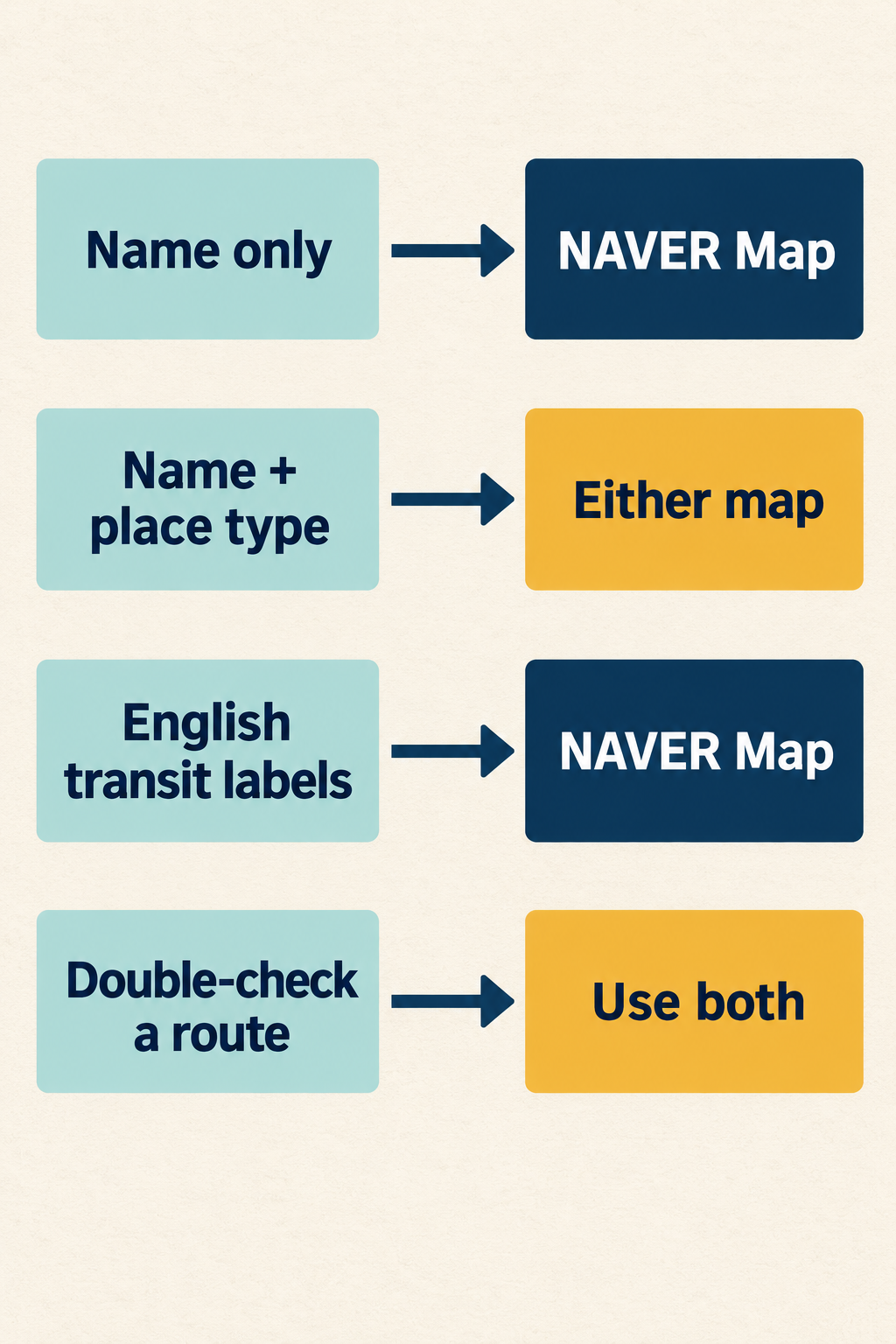
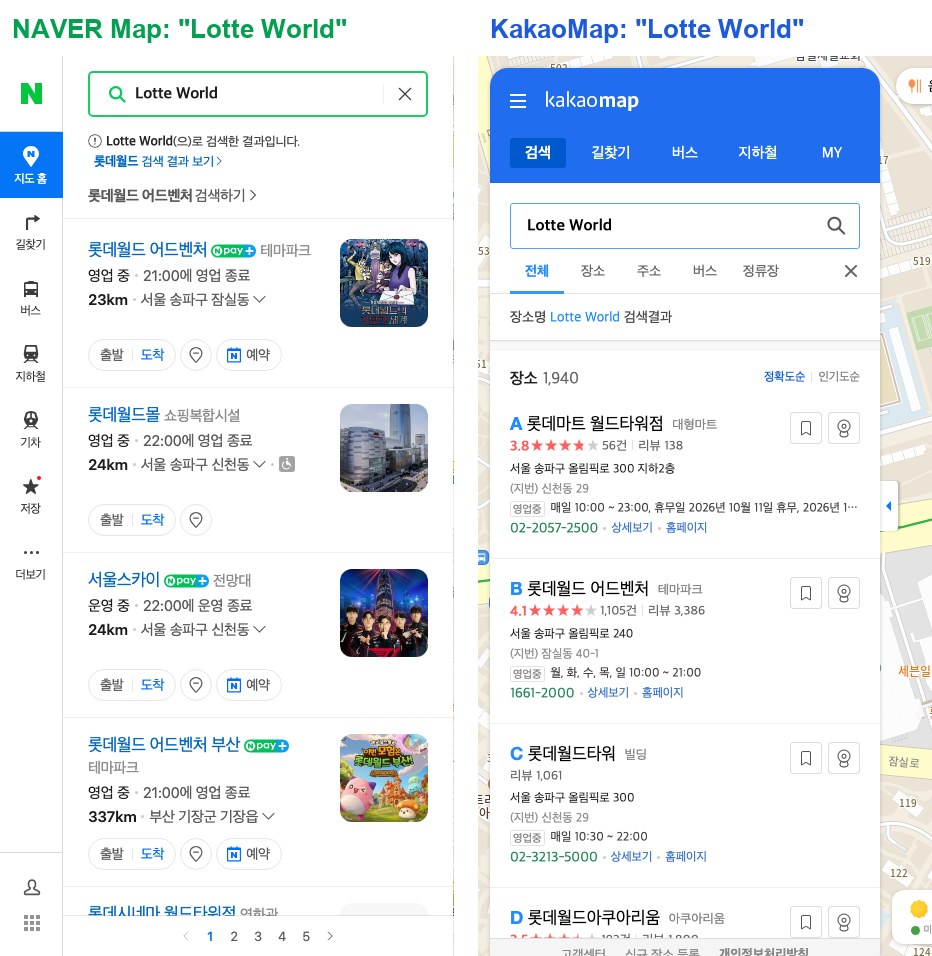
| Type a name on its own, without the kind of place (“Gyeongbokgung”, “Lotte World”) | NAVER Map | NAVER found the palace and the theme park first; KakaoMap put restaurants and a supermarket first |
| Type a name with the kind of place in it (“Gyeongbokgung Palace”, “Gwangjang Market”) | Either | Both put the place we meant first |
| Read transit routes in English on a computer | NAVER Map | Route labels and many stop names were English; on KakaoMap every label was Korean |
| Find Hongik Univ. Station from “Hongdae” | KakaoMap | KakaoMap put the station first; NAVER put the university first |
| Switch the phone app to English | NAVER Map | NAVER’s help page gives the steps; for KakaoMap, the pages we cite give only store listings and a 2018 reply |
| Double-check a route | Both | The first suggested bus was the same on both |
This table is our recommendation based on one day of tests, not a ranking from NAVER or Kakao.
How we compared
We used the same browser setup for both sites: a fresh Chromium browser window for every search, not signed in, browser language set to US English, time zone set to Seoul, and a 1440×900 window, from an internet connection in Seoul. We typed each English name into the site’s search box and pressed Enter, then read the first entries in the list. All runs took place between 5:36 and 5:44 p.m. Korea time on Thursday, October 1, 2026.
Earlier, we wrote up each desktop site on its own: NAVER Map in English on desktop (tested September 26) and KakaoMap in English on desktop (tested September 27). This time we ran them side by side.
Search: what came up first
| You type | NAVER Map, first entry | KakaoMap, first entry |
|---|---|---|
| Gyeongbokgung Palace | 경복궁 (palace) ✓ | 경복궁 (palace) ✓ |
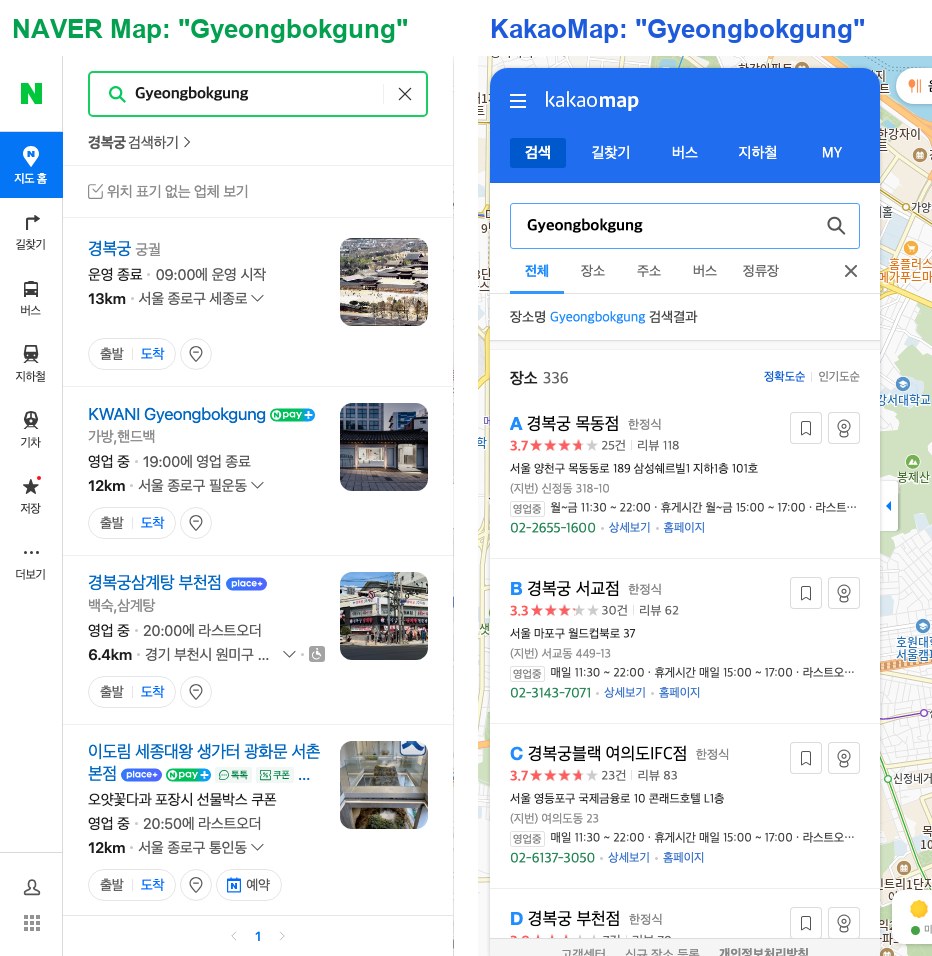
| Gyeongbokgung | 경복궁 (palace) ✓ | 경복궁 목동점, a Korean set-meal restaurant ✗ |
| Seoul Station | 서울역 (KTX station) ✓ | 서울역 (KTX station) ✓ |
| Seoul Station KTX | 서울역 (KTX station) ✓ | A parking lot in the station building ✗ |
| Hongdae | 홍익대학교 (Hongik University) | 홍대입구역 (Hongik Univ. Station, Line 2) |
| Myeongdong | Seoul Jung-gu Myeong-dong (area) ✓ | 남산케이블카 (Namsan cable car) ✗; Myeongdong street second |
| N Seoul Tower | N서울타워 (observation deck) ✓ | YTN서울타워; N서울타워 second |
| Incheon Airport | 인천국제공항 제1여객터미널 (Terminal 1) ✓ | 인천국제공항 (airport) ✓ |
| Lotte World | 롯데월드 어드벤처 (theme park) ✓ | 롯데마트 월드타워점, a supermarket ✗; the theme park second |
| Gwangjang Market | 광장시장 (market) ✓ | 광장시장 (market) ✓ |
✓ = the place we meant came first (our judgment); ✗ = something else came first. We left three results unmarked: both “Hongdae” results, because the two maps put different places first (the university and the station), and KakaoMap’s “N Seoul Tower” result, because we did not confirm whether YTN서울타워 and N서울타워 are listed for the same landmark.
What the table shows:
- Four searches worked on both. “Gyeongbokgung Palace”, “Seoul Station”, “Incheon Airport” and “Gwangjang Market” put the place we meant first on both sites.
- KakaoMap put something else first four times. “Gyeongbokgung” alone gave KakaoMap’s first three spots to restaurants named 경복궁 in other parts of Seoul (Mokdong, Seogyo, Yeouido); “Seoul Station KTX” put a parking lot first; “Myeongdong” and “Lotte World” put the place we meant second. On NAVER, “Gyeongbokgung” showed a “search 경복궁” line at the top and the palace first.
- Results change between days. On September 26, “Seoul Station” on NAVER showed businesses with “station” in their names instead of the station. On October 1 it put the station first, in three separate windows. Treat any single test, including ours, as a snapshot.
- Results come back mostly in Korean. On both sites, place names, categories and addresses in the entries we read were mostly Korean, even for English searches; some business names included Latin letters. NAVER’s Myeongdong area list came back in English.
Directions: the same trip on both maps
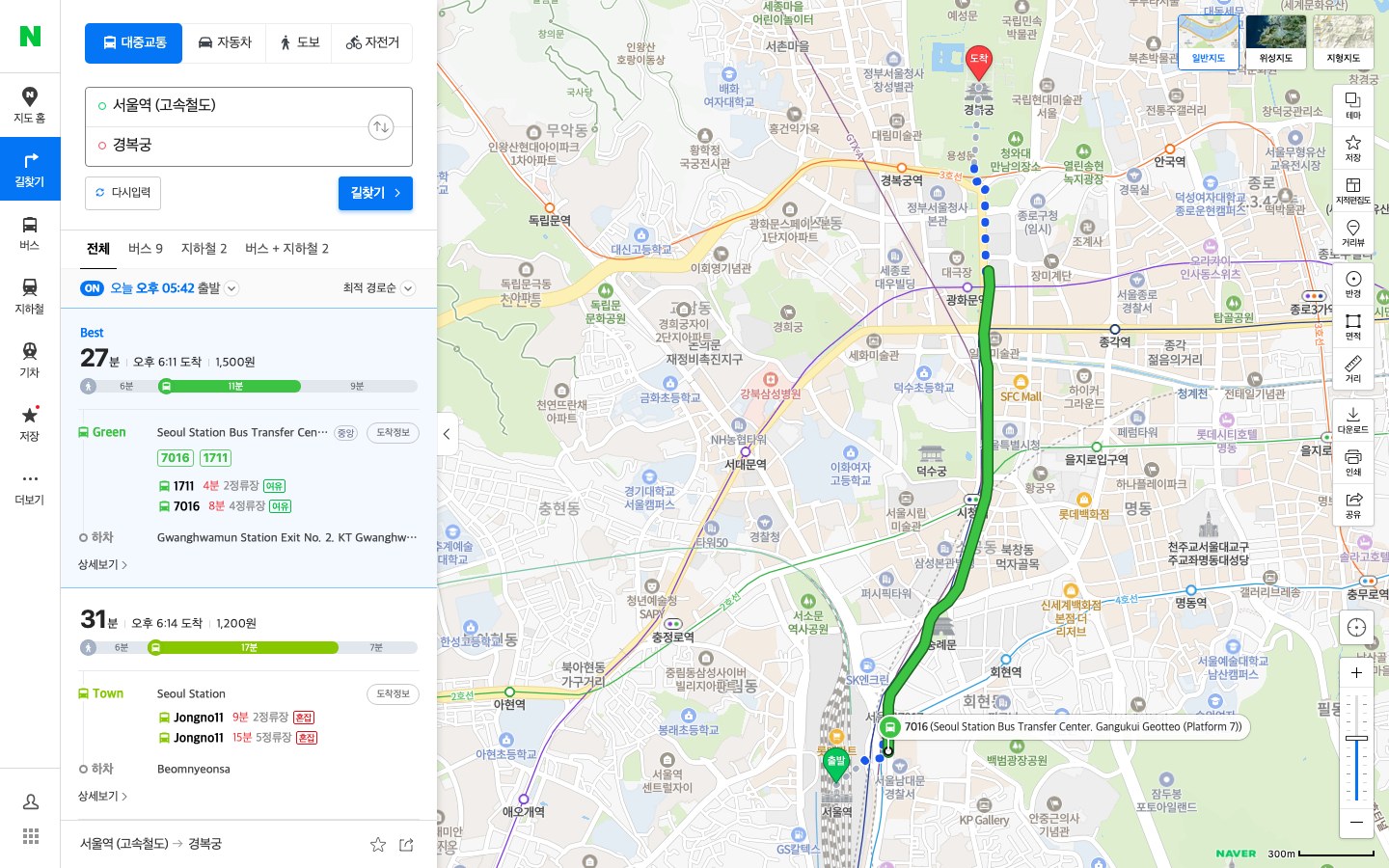
We asked both sites for public-transit directions from Seoul Station to Gyeongbokgung, typing the names in English, at 5:42 p.m. on a Thursday.
NAVER Map. The suggestions filled the boxes with Korean names, 서울역 (고속철도) and 경복궁. The results showed many labels in English: “Best”, “Fastest · Short transfer”, “Seoul Station Bus Transfer Center. Gangukui Geotteo (Platform 7)”, “Gwanghwamun Station Exit No. 2. KT Gwanghwamun Branch”, and line names such as “Line1”. Tabs, times, fares and buttons stayed Korean (for example 오후 6:11 도착, “arrive 6:11 p.m.”), and some stop names stayed Korean. The first route: 27 minutes, bus 1711 or 7016, ₩1,500.
KakaoMap. We typed “Seoul Station” and “Gyeongbokgung Palace”; the suggestion lists were in English (“Seoul Station”, “Seoul Station KTX”, “Gyeongbokgung Palace”), and picking them filled the boxes with 서울역 and 경복궁. It listed 15 routes, all in Korean. The first: 28 minutes (28분), 19 minutes of walking (도보19분), no transfer (환승없음), ₩1,500, bus 1711 or 7016 from the Seoul Station bus transfer center to Gwanghwamun Station Exit 2.
So both maps suggested the same bus first. NAVER’s version was easier to read in English. These are displayed estimates for one departure, not timed trips.
English in the phone apps: what each company says
We did not test either phone app. Here is what the companies publish:
NAVER Map. NAVER’s help page lists four app languages: Korean, English, Simplified Chinese and Japanese. Language settings need app version 5.1.3 or later. On Android, the path is MY icon (profile icon, top right) > settings gear icon > Language. On iPhone, use the same path, or your phone’s Settings > NAVER Map > Preferred Language. NAVER also notes that its Place Agent replies only in Korean. NAVER’s Google Play listing says “Korean/English/Japanese/Chinese maps and English navigation provided.” Our NAVER Map guide for foreigners has a section called “Set NAVER Map to English”.
KakaoMap. The US App Store lists the KakaoMap app’s languages as English and Korean, and Kakao’s Google Play listing has an English description. The Kakao pages we cite here do not give current steps for switching to English. A Kakao reply to a user on Google Play, dated 2018, points to Settings → App settings (설정 → 앱 설정) for the language; it is old, so treat it as a pointer, not current steps.
Which one should you download?
Our suggestion: install NAVER Map as your main map and KakaoMap as a backup. NAVER’s help page documents an English setting, and in our desktop tests it put the place we meant first more often and showed English route labels. KakaoMap is a useful second check: in our route test it suggested the same bus first, and for “Hongdae” it went straight to the subway station.
Two habits help on either map:
- Add the kind of place. “Gyeongbokgung Palace” put the palace first on both; “Gyeongbokgung” alone put restaurants first on KakaoMap in our test.
- Check the category under the name. If you searched for a palace and the first entry says 한정식 (Korean set-meal restaurant) or 대형마트 (supermarket), scroll down.
Korean words you’ll see on both maps
| Korean | Meaning |
|---|---|
| 길찾기 | Directions |
| 대중교통 | Public transit |
| 도보 | Walking |
| 분 | Minutes |
| 도착 | Arrive |
| 출발 | Depart |
| 환승없음 | No transfer |
| 하차 | Get off |
| 요금 / 원 | Fare / won (₩) |
| 궁궐, 고궁 | Palace (category) |
| 한정식 | Korean set-meal restaurant (category) |
| 대형마트 | Supermarket (category) |
| 테마파크 | Theme park (category) |
| 전망대 | Observation deck (category) |
| 시장 | Market (category) |
| 역 | Station |
Translations are ours, not NAVER’s or Kakao’s.
What we checked and what we didn’t
Checked: the desktop websites map.naver.com and map.kakao.com on October 1, 2026, with ten typed English searches on each (a fresh window per search) and one public-transit route on each. We read the first entries of each search list; on KakaoMap that was the first three entries.
Not checked: the NAVER Map and KakaoMap phone apps; being signed in; connections from outside Korea; driving and walking directions; browser translation tools; and this side-by-side comparison on other days or at other times (our earlier single-site tests were on September 26 and 27). Search results changed between our September 26 and October 1 tests, so yours may differ.
FAQ
Is NAVER Map or KakaoMap better for foreigners?
For English readers, we’d start with NAVER Map. In our ten side-by-side desktop searches on October 1, 2026, NAVER put the place we meant first 9 times and KakaoMap 4 times, and NAVER showed transit route labels in English. That is one day’s test, not a ranking. Both put the place first for “Gyeongbokgung Palace”, “Seoul Station”, “Incheon Airport” and “Gwangjang Market”.
Can I use KakaoMap in English?
The US App Store lists the KakaoMap app in English and Korean; we did not test the app. On the desktop site we found no language setting in our September 27 test, and its labels were Korean, though English search words worked.
Do both maps show the same bus routes?
For our test trip, Seoul Station to Gyeongbokgung, both suggested bus 1711 or 7016 first, at ₩1,500. That is one trip at one time.
Why does KakaoMap show restaurants for “Gyeongbokgung”?
In our test, restaurants named 경복궁 filled KakaoMap’s first three spots for “Gyeongbokgung”. Typing “Gyeongbokgung Palace” put the palace first.
Related Korea Sorted guides
- NAVER Map for Foreigners: Passport Verification & Accounts
- NAVER Map English Desktop: What Works (and What Doesn’t)
- KakaoMap English Desktop: No Setting Found, but Search Works
- NAVER Map No ETA: Check Your Bus and Find Another Route
Sources
All official pages checked October 1, 2026.
- NAVER Help: Language settings
- App Store (US): NAVER Maps, Navigation
- Google Play: NAVER Map
- App Store (US): KakaoMap
- Google Play: KakaoMap (English description)
- Google Play: KakaoMap, with Kakao’s 2018 reply on the language setting
- Our own tests: NAVER Map desktop site (map.naver.com) and KakaoMap desktop site (map.kakao.com), October 1, 2026.