
If NAVER passport verification is not working, start with the step where it stops. A camera that will not open needs a different check from a passport already used on another account. Before you take another photo, check the passport’s eligibility and whether your account details match it.
The short route: check the account and passport → fix the photo conditions → follow the face-check instructions → contact NAVER if the problem remains. If a reservation is time-sensitive, ask the venue about another booking route while you seek help.
Sources checked: September 29, 2026. This is a guide to NAVER’s published instructions, not a hands-on test of passport verification.
In this guide
- Find your next step
- Check the passport and account before retaking photos
- If the passport camera or photo fails
- If the face check fails
- If you need NAVER’s help
- If a reservation cannot wait
- What we checked, and what remains untested
Find your next step
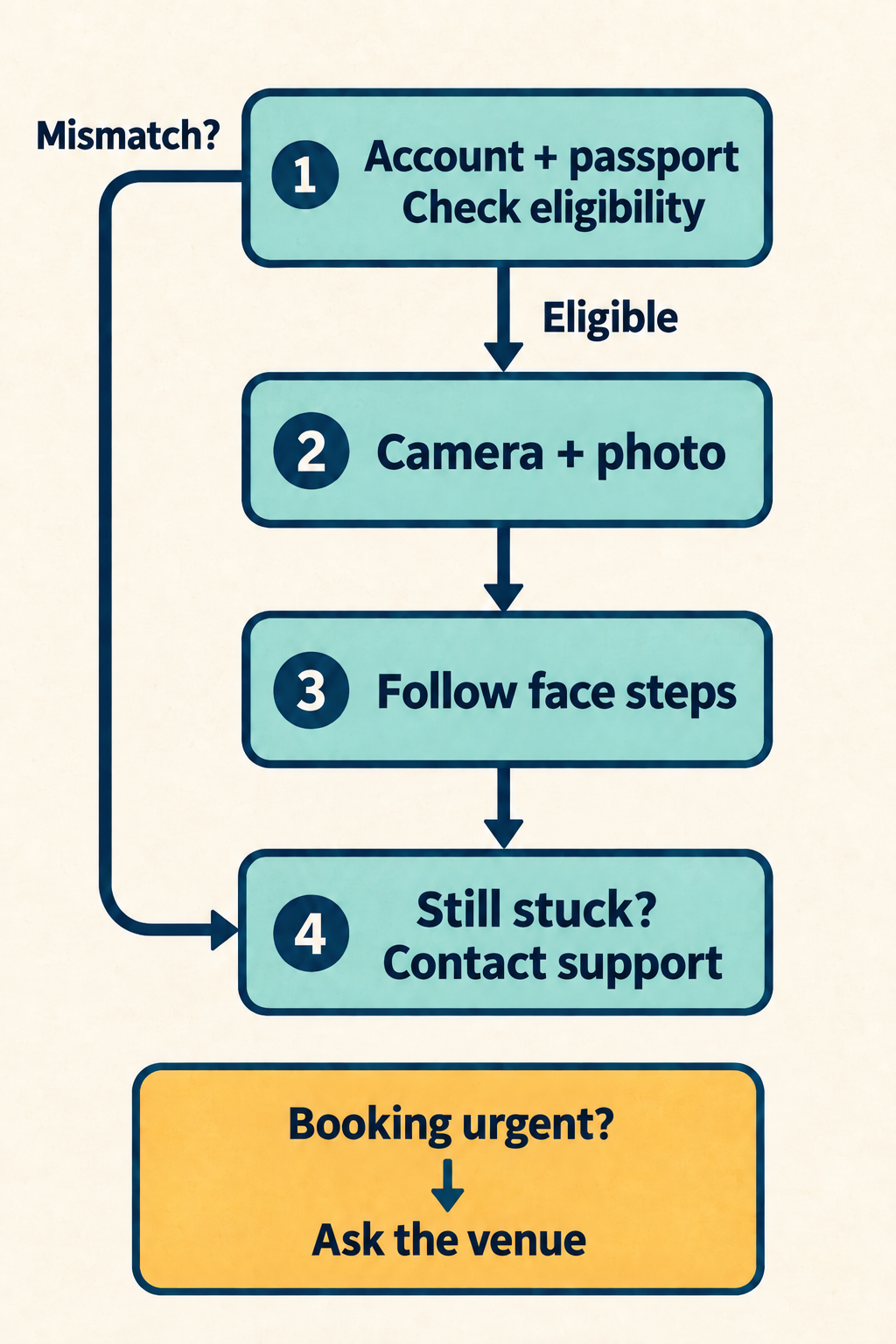
Diagram in words: “Account + passport / Check eligibility” comes first. “Eligible” leads to “Camera + photo”, then “Follow face steps”. “Still stuck? / Contact support” is the help route. “Mismatch?” skips the photo steps and goes to support. “Booking urgent? / Ask the venue” is a parallel booking alternative, not a verification result.
| Where you are stuck | What to do next | When to move on |
|---|---|---|
| The camera will not open | Check camera permission for the app you are using in your device settings. | If permission is allowed but the camera still will not open, contact NAVER; this guide has no tested device-specific fix. |
| The passport photo fails | Use the original passport on a flat surface in good light without reflections. | If it still fails after correcting those conditions, check eligibility and account details, then contact NAVER. |
| The face check fails | Face the camera, fit your whole face inside the frame and follow the on-screen movement instructions. | If the check still fails, record the error wording and ask NAVER for help. |
| The passport was used for another ID, is expired, or the account details do not match | Stop retaking photos; compare your situation with the eligibility rules below. | Ask NAVER about the account or document issue rather than treating it as a camera problem. |
| Verification appears complete but a booking is blocked | Read the booking or payment message and check the specific venue’s options. | Ask the venue about another way to book; successful verification is not a booking confirmation. |
These are our suggested next steps, based on NAVER’s instructions. They are not a diagnosis of your error message.
Check the passport and account before retaking photos
NAVER’s foreign passport verification help lists these eligibility conditions:
- The passport was issued by a country other than the Republic of Korea.
- It has not expired.
- It has not been used to verify another ID.
- The name and date of birth on the passport match the information submitted when signing up for the NAVER account.
Compare those details with the account you intend to use. If something does not match, use the help route below to ask how to correct it. The help page does not explain how it handles middle names, name order, spaces or a changed passport, so do not guess at a formatting workaround.
An expired passport does not meet NAVER’s conditions. Do not keep photographing it; arrange renewal with its issuing authority. If the old passport was linked to an ID, ask NAVER how to proceed with the replacement, since this page does not explain that case.
If you know the passport was used for a different ID, tell support that. NAVER does not describe a passport-transfer or unlinking procedure on this page. Creating another account is not a documented solution to that restriction.
Missing the verification option altogether? NAVER describes this service for foreign users who have difficulty with Korean mobile phone number verification when using reservation or ordering services. The same help page does not give the exact button path to start verification. Ask NAVER where to begin for the service you want, and include whether you are trying to make a reservation or place an order. Do not assume that changing the map language will make the option appear.
For general account and English-language setup, use our NAVER Map for Foreigners guide. This article focuses on what to check when verification stalls.
Update, October 5, 2026: If you do not have a NAVER account yet, see our guide to NAVER sign-up for foreigners. In our test of NAVER’s English sign-up page, the form asked for your name, date of birth, gender and a phone number for an SMS code, and the name step warned that you can’t verify your legal name if the name does not match your ID.
If the passport camera or photo fails
NAVER says to have your original passport ready and take a photo directly with the device’s camera during verification. A saved scan is not the method described in its instructions.
- Check camera access. NAVER directs users to Device Settings > App Permissions to allow camera access. Treat that as general guidance, not an exact menu path for every phone.
- Put the passport flat. Use a flat surface where light does not reflect from the page.
- Improve the light. NAVER specifically warns that insufficient lighting can cause verification to fail. Move to a well-lit spot while keeping reflections off the passport.
- Make an adjustment before retrying. If the camera still will not open, or the photo still fails, note which stage stopped and move to support.
The first three steps come from NAVER’s help page; the stop-and-escalate step is our advice. We have no verified retry limit or waiting period to recommend.
If the face check fails
NAVER says the face check follows the passport photo and compares your face with the passport photo.
Look directly at the camera with your entire face inside the frame. Follow the on-screen instructions and move naturally, as NAVER directs. We cannot supply a fixed sequence of head movements because the help page does not list one.
If it still fails, record the wording of the error and whether the failure came before or after the face check. Do not treat another person’s successful attempt as proof that the same device or account change will solve yours.
If you need NAVER’s help
The passport help page says to contact the Customer Center if verification is difficult. Its linked form is labeled “How to change nickname ID to a real name for foreigners or Koreans Living abroad”.
That label is broader than passport troubleshooting. Start from the official passport help page and its support link, and explain that your question concerns foreign passport verification.
Ask for troubleshooting, not an account conversion you do not intend. If you want the Things to do promotion, mention that before requesting any change: its help page excludes real-name-verified IDs, but does not explain whether passport verification counts toward that rule.
Prepare:
- The stage that fails: finding the option, camera, passport photo or face check.
- The exact error wording, if any.
- Your phone model, operating system and app version.
- The service you were trying to use, such as a venue reservation.
- Whether the account name and date of birth match, and whether the passport was previously used for another ID.
This is our suggested information list, not a list of required form fields. We opened the public support page but did not submit an inquiry or verify a response time.
For an initial description, you could write:
I am trying to use foreign passport verification for a reservation. The process stops at the passport photo stage. The camera opens, but verification fails after the photo. What should I check next?
Adapt the example to your actual problem. You do not need to include your passport number in that initial description. Keep document images out of public comments; if the official process requests documents, read its requirements before deciding what to submit.
If a reservation cannot wait
In its June 2026 announcement, NAVER says passport verification lets foreign visitors access supported bookings, orders and payments without a Korean mobile phone number. It also says support will expand in phases. Do not read this as a promise that every venue or checkout will work.
If verification appears complete but you cannot finish a booking:
- Read the new message and note whether it concerns identity, availability or payment. Do not restart identity verification merely because a later step failed.
- Check the venue’s own website or contact details for another reservation method. Ask whether it accepts direct reservations for your intended date and party size.
- If the venue cannot offer a workable method, choose an alternative rather than assuming you have secured a place.
Our suggested question: “I cannot complete the NAVER reservation. Can I book directly for my preferred date and party size? Please let me know the confirmation and payment requirements.”
These are planning options, not a guarantee that the venue takes direct bookings.
A separate payment rule: NAVER’s booking help says foreign members may be required to pay via Npay, with a monthly payment limit of ₩5,000,000. That does not tell us which foreign cards your particular checkout will accept.
A separate promotion rule: the Things to do help page says its foreign-tourist promotion is unavailable to IDs that have completed real-name verification. The page does not explain how that rule interacts with the newer passport verification flow. If that promotion is your goal, ask NAVER before changing your account’s verification status.
For a problem with that promotion’s bookings, use Contact Us at the bottom of the Things to do help page rather than treating it as a passport-photo problem. That contact route belongs to the Things to do guidance; it is not presented here as support for every NAVER booking.
What we checked, and what remains untested
We read NAVER’s English passport instructions, its linked public support page, the June 2026 announcement, and the booking-payment and Things to do help pages on September 29, 2026.
We have not tested passport capture, face matching, account changes, support submission, booking or payment. We also have not confirmed the current app entry button, verification from abroad, approval times, retry limits or how long verification stays valid.
The practical aim is to help you choose the next step, not to promise approval. Correct what NAVER explicitly describes, ask support about unresolved account or document issues, and keep a separate booking plan if timing matters.