Short answer: NAVER’s sign-up page works in English and asks for a mobile phone number that can receive a text message. On October 5, 2026, we opened the English sign-up page in a fresh browser and went through it with made-up details up to the phone number screen, where the country code list offered 215 countries. NAVER’s help pages say you cannot sign up any other way than with a mobile phone, and that it does not send codes to virtual phone numbers. Below is what each screen asked for, what the error messages built into the page say, and what NAVER’s own help pages suggest when the code does not arrive or sign-up is blocked.
Last checked: October 5, 2026. We used the English sign-up page in a computer browser from a Korean internet connection, at computer and phone width. We did not enter a real phone number, did not receive a code and did not create an account.
Quick answers
| Question | What we found |
|---|---|
| Is NAVER’s sign-up page in English? | Yes. The page has a language menu with Korean, English, Simplified Chinese, Traditional Chinese, Japanese and Vietnamese |
| Do I need a Korean phone number? | The English form let us pick from 215 country codes, including the US, UK, Japan and Australia. We did not test whether a code arrives on a foreign number |
| Can I sign up without a phone number? | NAVER’s help says you cannot sign up by any means other than a mobile phone |
| Can I use a virtual or online SMS number? | NAVER’s help says it does not send codes to virtual numbers, and the sign-up page has the error “Anonymous(safe) phone number is not allowed.” |
| What does “Sign up is limited temporarily” mean? | It is one of the sign-up errors built into the page, and the page tells you to contact Customer Service. We did not see it ourselves |
| Do I need a passport to sign up? | Not on the screens we saw. The page’s text includes a message, which we did not see on screen, asking new users to verify their identity and age |
How we tested
On October 5, 2026, we used a new browser profile with no NAVER cookies and the browser language set to English. Then we:
- Opened the English NAVER sign-in page and followed its Sign up link.
- Ticked only the required Terms of Service and pressed Confirm.
- Entered made-up details: the name “Test,” the birth date 19900101 (January 1, 1990) and the gender “Other.”
- Stopped at the phone number screen and opened the country code list.
We did not type a phone number, tick the SMS consent box or press Send Code, so we did not see the ID, password or final screens. We also saved the English text the sign-up page loads with it, which includes its error messages. Our connection was in Korea.
1. What the sign-up form asks for
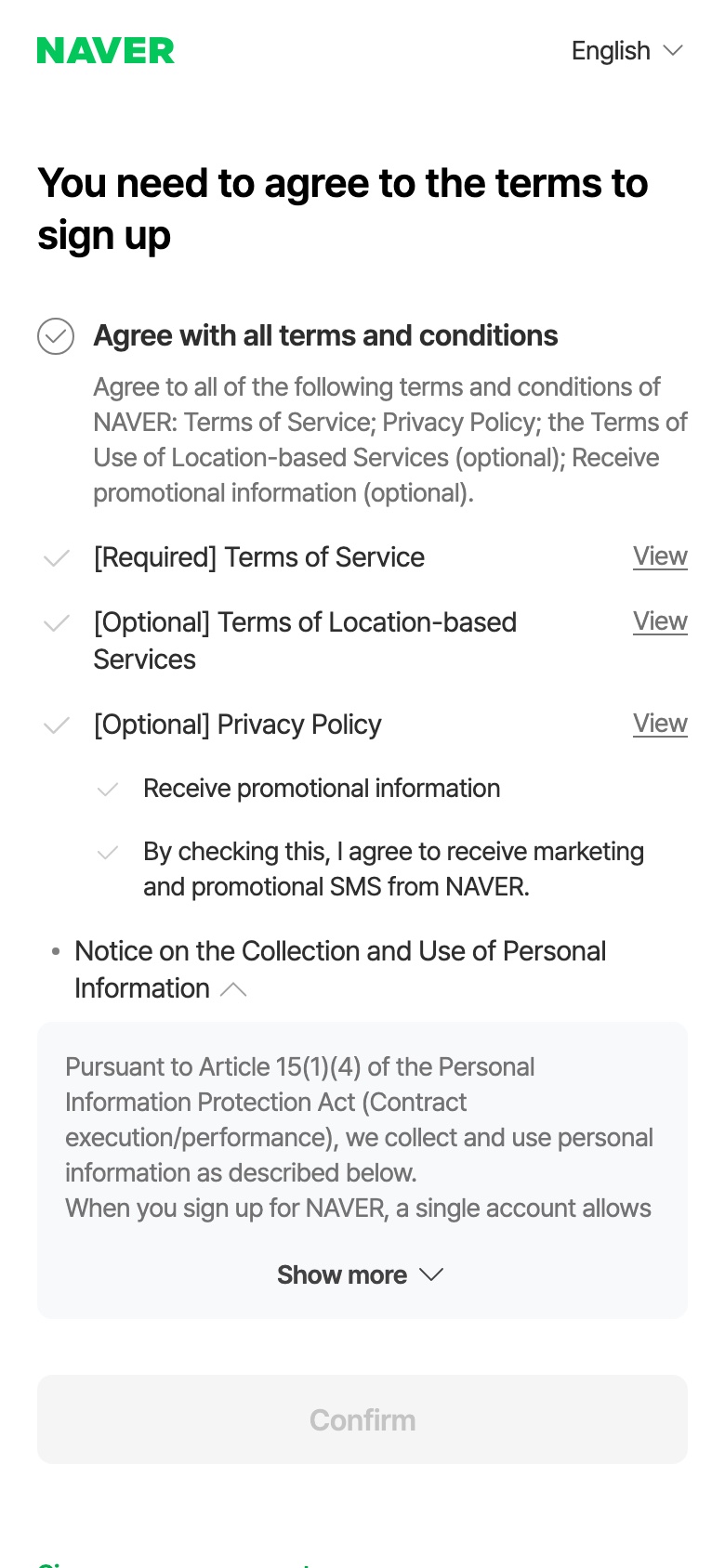
The English sign-up page started with a terms screen titled “You need to agree to the terms to sign up.” Only the Terms of Service was marked [Required]. Location terms, the privacy policy item and promotional messages were marked optional or listed separately.
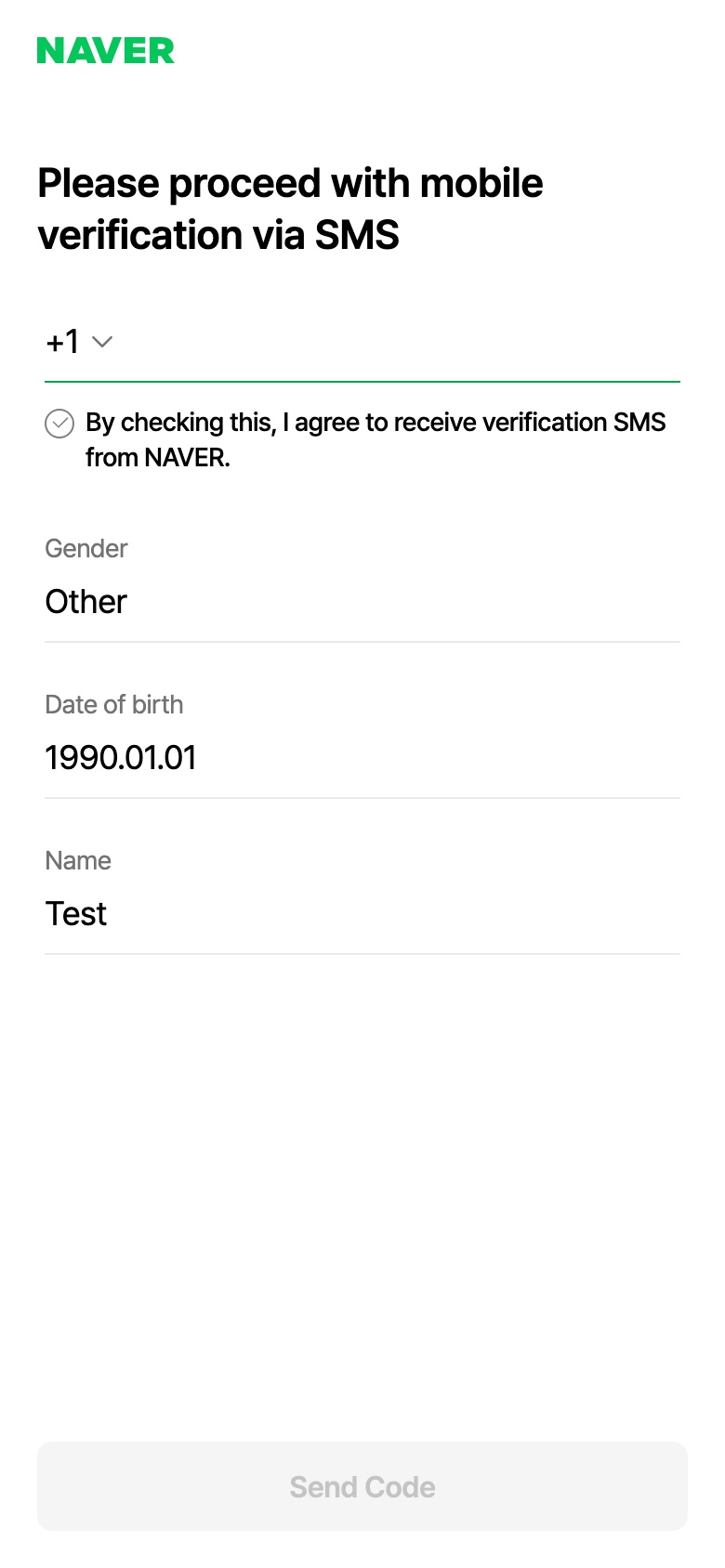
After Confirm, the form asked for one thing per screen, in this order:
- Name. The hint said: “Please use Korean or English characters. You can’t verify your legal name if the name do not match the information on your ID.”
- Date of birth, as an 8-digit number (for example 19900101).
- Gender, with Male, Female and Other.
- Phone number, under the title “Please proceed with mobile verification via SMS,” with a country code button, a box to agree to receive the verification SMS, and Send Code.
The text the page loads also has wording for later steps: code-entry text such as Resend and Extend validity; a NAVER ID of 5 to 20 characters (lowercase letters, numbers, underscores and hyphens); and a password of 8 to 16 characters. We did not reach any of those screens, so we cannot confirm how or in what order they appear.
Our recommendation: use your real name, date of birth and gender, exactly as they appear on your ID, for example your passport. NAVER does not ask for a passport on the screens we saw, but its help says you may not be able to verify your legal name if the name, date of birth and gender on your account do not match your ID. The same three details come up again if your account is ever restricted (see section 5).
2. Picking your country code
The phone screen showed +1 before we chose anything. Tapping it opened “Please select a country code,” a list of 215 countries in alphabetical order, from Afghanistan +93 to Zimbabwe +263, with United States/Canada +1 ticked. The list included Korea (Rep. of) +82, Japan +81, China +86, the Philippines +63, Australia +61, Germany +49 and the United Kingdom +44.
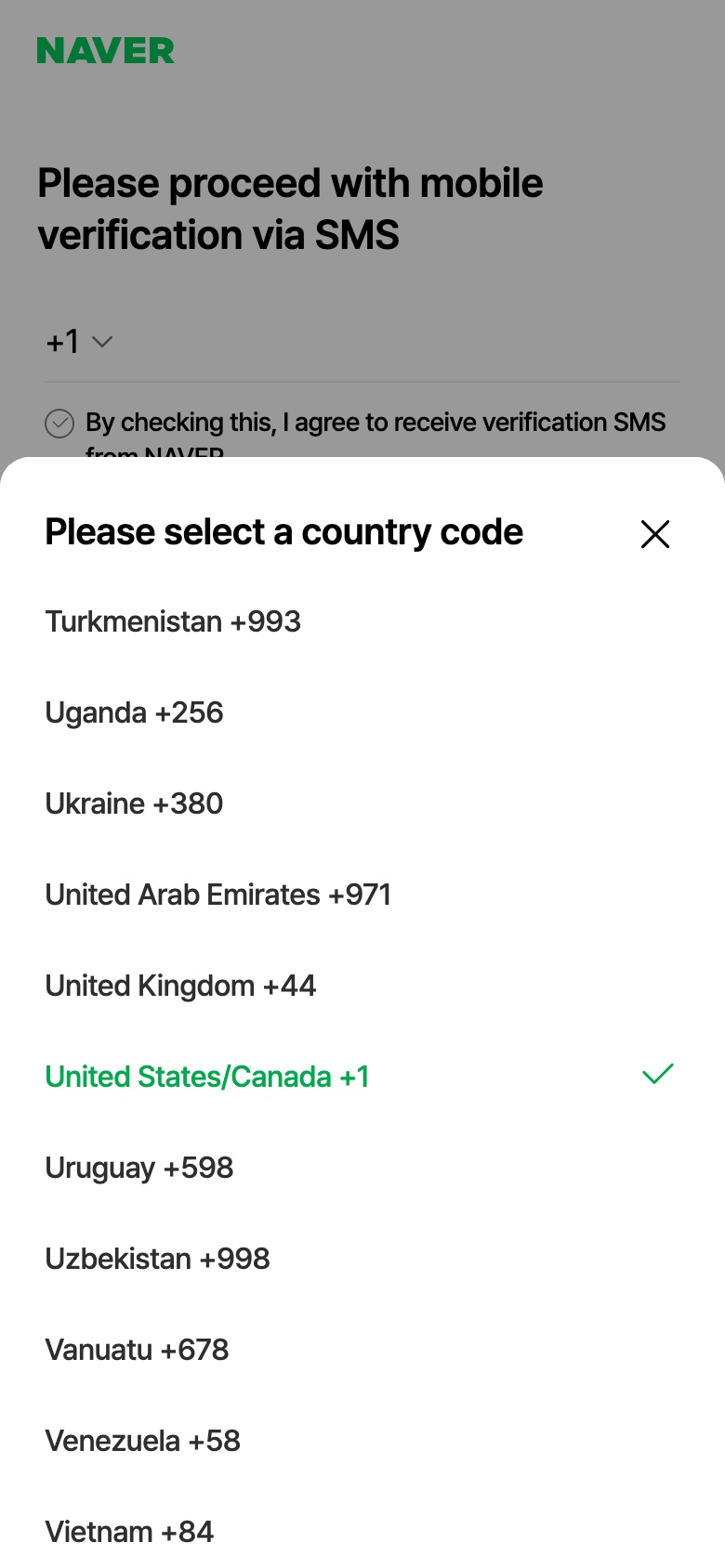
So at this step the form lets you pick a foreign country code. Whether a text actually arrives is a different question: NAVER’s help says that in some countries text messages may be delayed, and that you may need to wait a few minutes for the code.
3. “Sign up is limited temporarily”
This message is one of the sign-up errors written into NAVER’s English sign-up page: “Sign up is limited temporarily. Please contact Customer Service.” In the page’s code, its label is ipBlocked, which suggests it is tied to the internet connection you sign up from rather than to your details. We did not trigger it, so we cannot say exactly when it appears.
Separately, NAVER’s help pages describe login restrictions for accounts created through an abnormal process. They say that when there are attempts to sign up through an abnormal process under an unsafe environment, the login will be restricted, and that NAVER restricts logging in for accounts created abnormally in an unsafe environment because they are likely to have been created with stolen personal information.
What we would try, in this order:
- Wait and try again later, on a connection you normally use, such as your home internet or your phone’s data, with any VPN turned off. This is our suggestion, not NAVER’s.
- If it keeps appearing, do what the message says and contact NAVER Customer Service. The help page on verification problems links to a form to “Leave an inquiry regarding mobile authentication failure when signing up.”
A related error: the page also has “The country code of the phone number does not match the country information of your IP.” That wording suggests NAVER compares the country code you pick with the country your connection appears to be in. Our suggestion, which we have not tested: check the country code first, and if you use a VPN, which can make your connection appear to be in another country, try again with it turned off. We did not trigger this error either.
4. The verification code doesn’t arrive
NAVER’s help pages list these checks:
- Spam filters. Check whether a spam blocker app filtered the text. NAVER’s text messages come from 1588-3820, which NAVER calls its official help center number, so check that numbers starting with 1588 are not blocked on your phone.
- Virtual numbers. NAVER says it does not send a verification code to virtual phone numbers, and asks you to try again with the original number.
- Delays abroad. In some countries, text messages may arrive late. NAVER’s help says you may need to wait a few minutes for the code to arrive.
- Limits on the same number. NAVER’s help says one number can be used to verify once a month and three times in six months, and that only three accounts can be registered with it. One help page notes the once-a-month rule for valid Korean numbers.
The page’s text also includes code-screen wording such as Resend, Extend validity and “Didn’t receive the verification code?” We did not reach that screen.
5. Why not use an online SMS number
Several of the top Google results for these searches sell temporary or “virtual” numbers for NAVER sign-up. We do not recommend them, for three reasons from NAVER’s own pages:
- NAVER’s help says it does not send codes to virtual phone numbers, and the sign-up page has a ready-made error for them: “Anonymous(safe) phone number is not allowed.”
- NAVER’s help says that if account details do not match the mobile phone subscriber’s name, date of birth and gender, login restrictions cannot be lifted, and gives the example of signing up with a nickname instead of a real name.
- If your account’s login is restricted and you live outside Korea and cannot verify yourself, NAVER’s help asks you to send a copy of an ID issued in your country of residence, such as a foreign passport, foreign driver’s license or foreign residence permit, with a request to lift the restriction. It says the ID must include the name and date of birth entered in the account. An expired ID cannot be processed, and requests from overseas may take longer.
In short: an account made with a borrowed number and made-up details can be hard to get back if NAVER restricts it. Use your own number and your real details.
6. After you sign up
The sign-up page’s text includes this message: “Your Naver account has been created. Please verify your identity and age to use the service.” We did not create an account, so we did not see when it appears. NAVER’s help says foreign nationals can verify their identity with their passport when using reservation or ordering services. If that step fails, see our guide to NAVER passport verification.
Two more things from NAVER’s help:
- One name can have up to three NAVER accounts.
- Users who are categorized as foreigners may be partially restricted from some NAVER services; the help page gives AdPost as an example.
Once you have an account, you can save places in NAVER Map. See our guide to NAVER Map bookmarks.
What we did not test
- Receiving a verification code on a foreign or Korean phone number.
- The ID, password and final screens.
- The “Sign up is limited temporarily” and country code errors, and what triggers them.
- Signing up from outside Korea, on the NAVER app, or on the Korean-language sign-up page.
FAQ
Can I make a NAVER account without a Korean phone number? The English sign-up form let us choose from 215 country codes at the phone step. We did not test whether the code arrives. NAVER’s help says texts may be delayed in some countries.
Can I sign up with an email address instead of a phone number? NAVER’s help says you cannot sign up by any means other than a mobile phone. The phone does not have to be in your name.
Can children sign up in English? NAVER’s help says children under 14 can sign up with a parent’s consent through the Korean page.
How many NAVER accounts can I have? NAVER’s help says up to three accounts per name, and up to three accounts can be registered with one phone number.
I just need NAVER Map. Do I need an account? For getting around, start with our NAVER Map guide for foreigners. Saving places needs an account: in our October 4 test, NAVER Map’s save button sent a browser that was not signed in to the NAVER sign-in page.